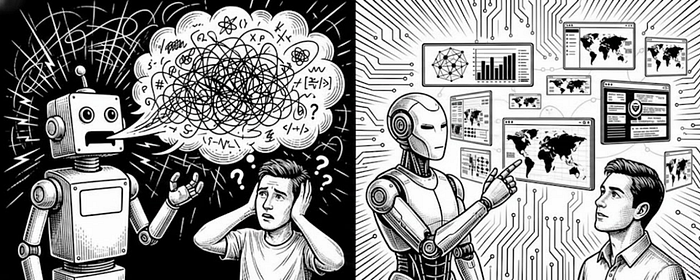


If you follow my work, you know I am a visual guy. Most of what I do focuses on turning complex investigations into clear and digestible outputs so you can understand a threat or an incident at a glance.
I often publish my designs on social networks, and one of my most popular blog posts is where I keep track of everything: https://blog.securitybreak.io/security-infographics-9c4d3bd891ef
In 2023, I even published my first book around this concept, Visual Threat Intelligence: An Illustrated Guide for Threat Researchers.
I strongly believe that one picture is worth a thousand words. And if you are following me, I am betting you believe that too!
Visuals. That is exactly what we are going to discuss in this blog!
I will explain why, in modern threat intelligence, visualization is more important than ever, how you can take advantage of it, and how to avoid the mistake the security industry is currently making with the explosion of AI agents.
Take a coffee, buckle up, and let's talk about some CTI powered by AI minus the hype!
If you want to learn how to leverage AI for Threat Intelligence or understand how threat actors take advantage of AI, check out my latest training at BlackHat. I have a dedicated module to what we are going to discuss here!
The current state of AI for CTI
If you pay attention to the current development and evolution of AI agents for cybersecurity, threat hunting, threat intelligence, and related areas, you might realize that most of them do the same thing.
They take some input data, whether it is a threat report, the result of a hunting query, or something else, and produce a lengthy output that, for analysts, often creates more noise than it actually helps or speeds up the investigation.
This innovation was very impressive in 2023 when we started exploring AI agents for CTI, but today I believe we need to push it further.
What is Generative UI?
At this point, everyone knows what Generative AI is. However, only a few have heard about Generative UI.
The web we know today was built on static foundations. When you visit a website, the interface is the same for every user. It only changes when the company behind it decides to update it.
In some cases, you may have access to a dashboard that you can customize, but this remains limited.
Now imagine if the interface could be generated based on what the user requests. Something dynamic. Something tailored to the user's needs and context.
This is where Generative UI becomes interesting.
It is the process of dynamically creating an interface that adapts to the user.
But how do we build it? And more importantly, how do we apply it to threat intelligence?
There are multiple ways to leverage it, but for the sake of this blog, I will focus on the recent MCP developments and I will also discuss about A2UI. At the end of this blog, I will also show you what could look like your future investigation.
MCP UI or MCP Apps
If you missed the news, MCP or Model Context Protocol, is a standard adopted by the industry to extend AI capabilities. I already covered this topic in a previous blog, so feel free to read it.
What I want to discuss here is the latest proposal for MCP, also called MCP UI or MCP Apps. Let me explain what it is.
Edit: I originally started working on this blog in November 2025, when MCP UI was only a proposal. It is now fully supported by the MCP protocol. And it is not called anymore MCP UI but MCP Apps.
MCP Apps is an extension to the Model Context Protocol that allows an MCP server to deliver interactive user interfaces to a host, not just text or structured tool output. It defines a standard way to declare UI resources using a ui:// URI, link them to tools through metadata, and render them as sandboxed HTML iframes.
The UI and the host communicate bidirectionally over the MCP JSON RPC channel. This means a UI can trigger tool calls, receive results, and update its state in a controlled and auditable way.
To simplify with a fun analogy, imagine LEGO blocks. You decide which pieces to use, how they connect, and what they look like. The system snaps everything together and keeps it consistent.
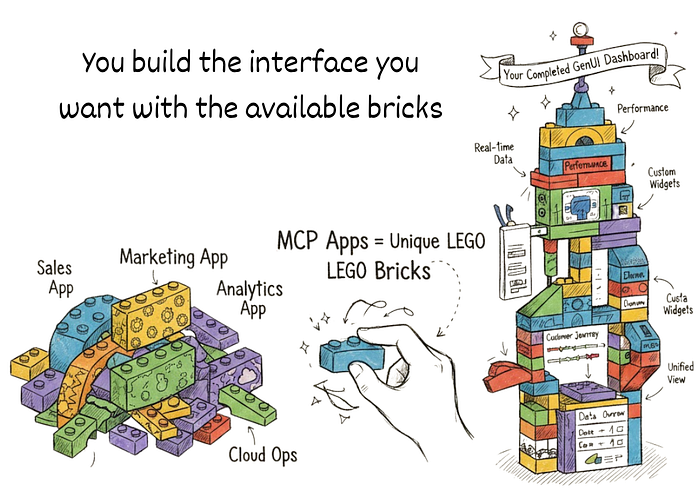
In the next part of this blog, we are going to experiment with MCP apps for threat intelligence
Using MCP Apps for Threat intelligence.
At the beginning of this blog, we discussed the current state of AI agents for CTI and the lengthy summaries they generate instead of properly curating the information.
In this part, we are going to create an MCP Apps for a threat report and see what we can practically do with it.
To construct an MCP Apps, we first need to understand how it works.
Here is a clear overview of how the system works.
1. The Server Setup (Two Part Registration)
Developers must register two components on their server:
- The Tool: This is the functional piece of code that the LLM or host application calls. It executes specific logic, such as fetching the current time or processing a threat report.
- The Resource: This is the content, usually bundled HTML, that defines the interactive UI. We can call it widget.
The two are linked because the tool registration includes a dedicated field that points to the URI of the UI resource.
2. The Host Interaction (Rendering and Security)
When the host application, calls the registered tool, the flow transitions to the client side:
- Resource Retrieval: The server responds with the output of the tool along with the URI referencing the UI resource. The host then fetches and loads this resource.
- Secure Rendering: The host uses a component, such as UIResourceRenderer for React or Web Components, to display the UI. All remote code executes inside sandboxed iframes.
- Client Communication: Once rendered, the UI becomes a client application. It uses internal mechanisms to communicate back to the host and can trigger additional server tool calls based on user interactions, for example when a button is clicked.
Building your GENUI CTI with MCP Aps
Now that we understand a bit more about how it works, let's see how we can build it for CTI.
In this example, we will process a threat report, generate a dashboard from the data, and add enrichment actions for IOCs and MITRE ATTACK techniques. Simple enough!
To dynamically generate the data using the widgets I wanted, I first had to define the structure of each widget. This part is relatively simple and you can build it using React or generate it with your favorite coding agent.
When you request a threat actor profile, the model selects the appropriate widget, injects the correct data, and displays it to the user.
The interesting part is that these widgets can be dynamic. Users can interact with them to retrieve additional data. For example, clicking on an extracted IOC can trigger an enrichment action.
In the example below, I created different widgets.
- A threat actor profile that gives you the overview and includes a summary of the processed report. It also displays the IOCs and the MITRE ATT&CK techniques

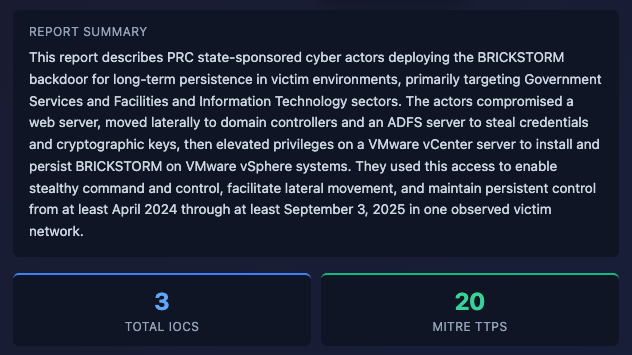
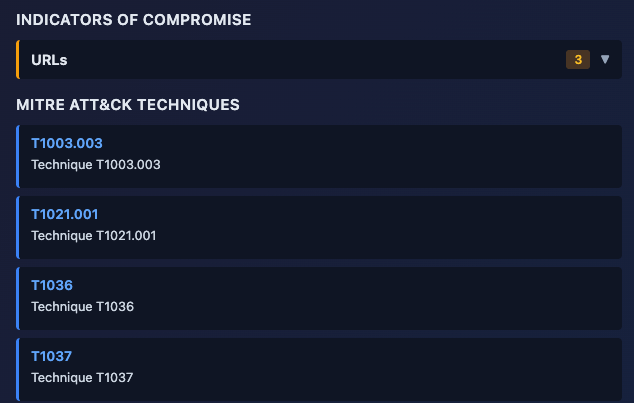
- Then, when you click on an IOC, another widget is dynamically generated. The same applies to the MITRE ATT&CK techniques.
You can see the following video to see the whole demo.
In the demo, the widgets are generated dynamically using the external data we loaded. Now you can go from lengthy text to an actual dynamic dashboard.
A2UI: Agent-driven interfaces
The second framework I want to discuss is A2UI.
A2UI is a protocol created by Google that allows AI agents to also generate user interfaces instead of only text, similar to MCP Apps, except A2UI is agent-driven (AI dynamically assembles simple JSON UI blueprints from a safe component catalog at runtime for native rendering), while MCP Apps are developer-driven (pre-built custom web apps referenced by tools and rendered in iframes).
Rather than an agent replying "What time?", the agent sends a description of UI elements (buttons, pickers, forms) that your app can render with its own components.
The agent does not send HTML or code. It outputs a stream of JSON messages that describe UI elements, state, and updates.
Each message contains components like table, form, chart, along with data and intent. These messages are sent over a transport layer such as HTTP streaming or WebSocket.
On your side, the client parses this JSON and maps each component to your own UI library, for example React components. That means your frontend decides how everything is rendered, styled, and secured.
When the user interacts with the interface, clicks a button, selects an IOC, submits a form, events are sent back to the agent. The agent processes the input, updates its reasoning, and returns a new set of UI messages.

A little more flexible than MCP Apps!
Building a CTI Log Analyzer with A2UI Protocol
Okay let's see how we can leverage A2UI for CTI now.
In this example, we will create an interface with A2UI where an analyst can upload any kind of logs, and those logs will be processed by our agent and visualized in a generated widget.
The idea behind A2UI is that the agent defines what to display and the client decides how to render it using its own native widgets.
On ingest, logs are parsed with a universal parser that supports syslog, firewall logs, IDS alerts, auth logs, web logs, and JSON... Each line is normalized into a clean structure with timestamp, severity, IPs, message, and category.
From that, the backend builds a full widget. Stats, filters, search, and a log table appear in milliseconds. The LLM analysis comes after and streams into the same interface with extra context like alerts or IOC summaries.
Components are stored as a flat map. Each component references others by ID. This allows partial updates. You update one piece without touching the rest.
In the screenshot below, you can see the widget my system created. This widget is fully interactive and it allows you to search and filter through the logs. You instantly get a dashboard for any type of data.

We can then simply imagine multiple widgets for different file formats, such as PCAP, EVTX, or even unstructured data.
You have now a universal data loader without dealing with the complexity of transforming, sorting or ingesting.
The video below shows how it works. We now have a working prototype that can dynamically analyze any kind of logs.
Pushing it further
Dynamic widgets in a chat are great, but they disappear as the conversation moves, which makes them hard to find again.
So I wanted persistent access to the UI I generate. That is how I get the idea of IntelWall and the concept of Prompt To Wall.
Prompt To Wall
Are you familiar with an investigative board? You know those scenes in movies where an investigator pins photos of a suspect on a board and connects them with strings to clues or accomplices.

I found this concept interesting for threat intelligence. We often investigate threat actors and link them to infrastructure, capabilities, or victims to understand the bigger picture.
CTI reports are linear but Investigations are not. That is how the idea of Prompt to Wall came up.
The idea is simple. Generate an investigative board directly from text using an LLM. Instead of reading a report and mentally connecting the dots, the system builds the investigation for you.
For my training, I built a playground called IntelWall where you can interact with the data and generate your own dashboard. You can create links between entities, explore relationships, and enrich the data over time.
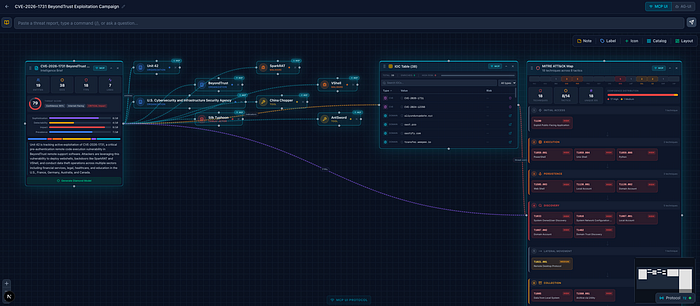
You move from a static report to a living board you can navigate, update, and expand as your investigation evolves using generative UI!
I also created a full demo to show how it works.
Conclusion: The Future of CTI is interactive, not verbose
Most AI CTI agents generate a lot of text. In many cases, this creates more noise than creates actual value for the analyst.
Generative UI is an interesting direction. It allows you to build dynamic interfaces tailored to each analyst instead of forcing everyone into the same static view. What we saw in this blog is covered in depth in my training, so I recommend taking a look.
If you stretch this idea further, interfaces as we know them may disappear. In an Internet of AI agents, you do not need fixed interfaces anymore.
Today with coding agents anyone can generate their own on demand, which reduces the value of static UI design. But if you extend the IntelWall concept, you can imagine a new kind of browser that generates widgets and interfaces dynamically based on your needs. You see where this is going? 😉
My hope is that the next generation of AI CTI tools takes this into account so it becomes more relevant for our field. Your investigations become more focused, more visual, and easier to navigate.
Thank you for reading. If you want to stay updated on AI CTI, follow me on social and share this blog with your network.