

When I bought the iPad Mini a year ago, I intended to replace my Kindle. I wanted my entire digital library on Apple Books. Having done that, I was enjoying my time reading on the Mini until I saw that Amazon had released its new lineup of Kindles, which were available to buy in my country.
And I was back in the loop. I didn't sell my Mini, but I did buy the latest Kindle Paperwhite to see how good it was. To be fair, the Kindle was always the better eReader, but I was really hoping the new one wouldn't make me cheat on my iPad Mini.
SPOILER: It Did.

Non-Members can read this story from the link provided in my Socials — X| Threads| Instagram| Bluesky 🔗
But not entirely. Now, I carry around two 7–8" tablets with me just for reading. I have just not been able to choose between a slick dedicated Amazon eReader with a beautiful 300 ppi e-ink display & battery that lasts months, versus my cute Apple tablet with a colorful LCD but relatively mini battery life.
For most people, there's no debate. They would pick one and move on. But for someone who loves reading yet is deeply invested in the Apple ecosystem, this is worth a 1500-word story outlining my introspection, exploration, experimentation, and realization.
So, before stepping into 2026, I did a short two-week experiment during the holiday season in December to find out which of the two devices would help me achieve my reading goal.
Hey Readers! This is Aditya here 🙋♂️
Today's story is a simple reading face-off: Kindle vs iPad mini. If you find a tip worth stealing, leave a clap 👏 or highlight 🖍️ your favorite line so other readers can spot it instantly.
The 15-Day Reading Experiment 🔬
To find out the better eReader for me, I decided to do a 14-day experiment. The setup was pretty simple:
- I would spend 7 days using just one device as my sole eReader. For the sake of continuity, I read the same non-fiction book during the seven-day time periods.
- During this time, I would keep an account of: the pages I read during the day, how long I read, how much battery I drained over time, and any other device-specific settings that prompted me to read more/less.
- On the 15th day, I would read for one hour (with a little bit of a twist in settings) on each device concurrently before giving my verdict.
I am not using any scientific method to count and analyse all this data, except for noting it down in Notes. The point of this experiment was to figure out if I was subconsciously enjoying reading on one device more than the other.
The results of this experiment were a bit… inconclusive. But I will let you decide for yourself after reading it all. PS: Please don't judge my reading speed.
My Observations
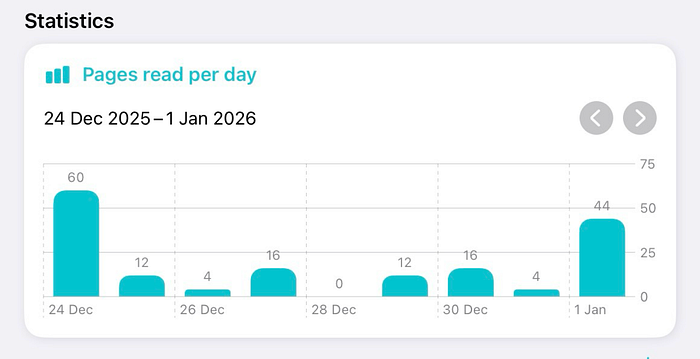
In the first week, I read solely on my Kindle Paperwhite. I tried my best to read for at least 30 minutes a day and managed to read 108 pages that week. That's about 15 pages/day. Over the entire week, I didn't have to manage the battery at all, as it only dropped 5–6% during that period.
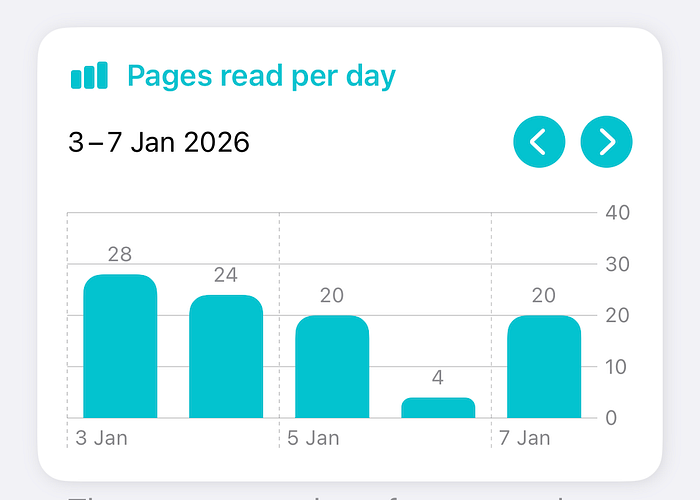
In the second week, I committed to reading solely on the iPad mini, aiming to read at least 30 minutes per day. I read about 96 pages that week, averaging about 14 pages/day. Unlike the Kindle, I had to manage the battery several times that week — charging it almost every third day (and that's without the Apple Pencil paired to it).
A quick reflection of these fourteen days, comparing the iPad mini and Kindle side-by-side, I realized the page refresh on the Kindle was way faster than the iPad mini despite the former lacking a higher refresh rate. Amazon has clearly worked on this one setting, and you can tell the difference. On the other hand, Apple Books on iPad lets you choose the page turn animation — and trust me, once you have the 'page curl' animation turned on, you won't feel like going back to any other. It's extremely satisfying and made up for the lesser pages read on the Mini.
Apple Books is in a league of its own when it comes to the reading experience customization. If you are avid reader on the iPad, I recommend you check out this story next:
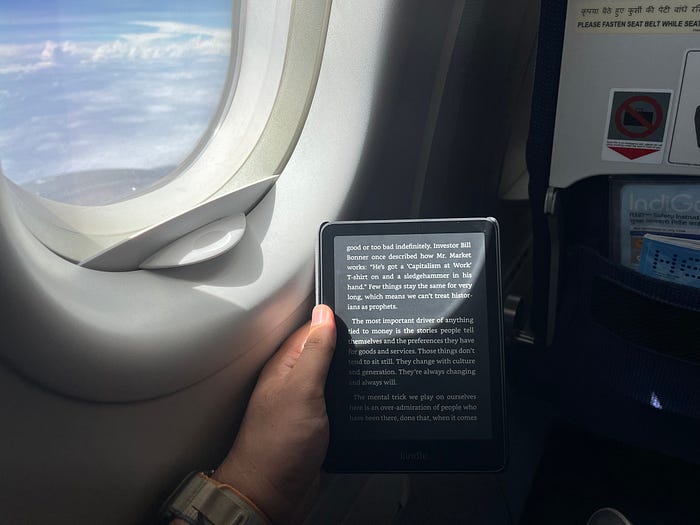
And then on the 15th day, I conducted a 1-hour speed-reading session on each device. Except, this wasn't going to be in the same indoor settings as the last fourteen days. I decided to read in bright sunny outdoorsy settings — on a short morning flight and in an afternoon car ride, both while the sun shined bright on my face and on the ereader. This was to find out which one would perform better on vacations and during traveling.
On the Kindle, I managed to read 38 pages in that single hour. The sun didn't bother me at all. Okay, maybe it bothered me a little, but it did not affect the Kindle's e-ink display. There was absolutely zero glare, and the words were as crisp as in any paperback. The best part is that it didn't have to be on any max brightness setting, so the backlight didn't drain the battery as much.
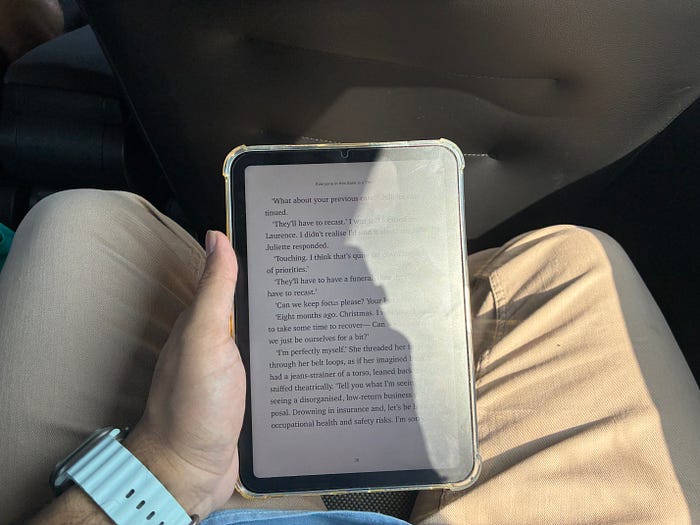
On the other hand, the iPad mini was suffering outdoors and made me suffer too. I somehow managed to read about 22 pages with the iPad's max brightness setting (500 nits). The matte screen protector I had applied to the iPad didn't help much against the sun either. The one-hour reading session was a torture fest, as the glare constantly blocked out sentences and paragraphs on the page. Not to mention the 20% battery drain within the hour.
So that's how the 15-day reading experiment came to an end. The first fourteen days made me think the iPad mini was on par with the Kindle if we just had to mind the average reading time and pages read. But of course, the experience tells a completely different story.
By now, you might have guessed in whose favor the verdict might be. But hold on to that thought, because we have a wildcard right before the climax.
The Wildcard: Genre of Note-Taking ✏️ 📖
Over the fifteen days of the experiment, I focused solely on the eReader's ability to keep me in the reading zone. Sure enough, the Kindle's e-ink display won over the iPad's LCD in terms of reading comfort in any environmental setting (sunny, indoors, night, or day). But we also have to consider each person's capabilities, or lack thereof.
I am talking about note-taking while reading.
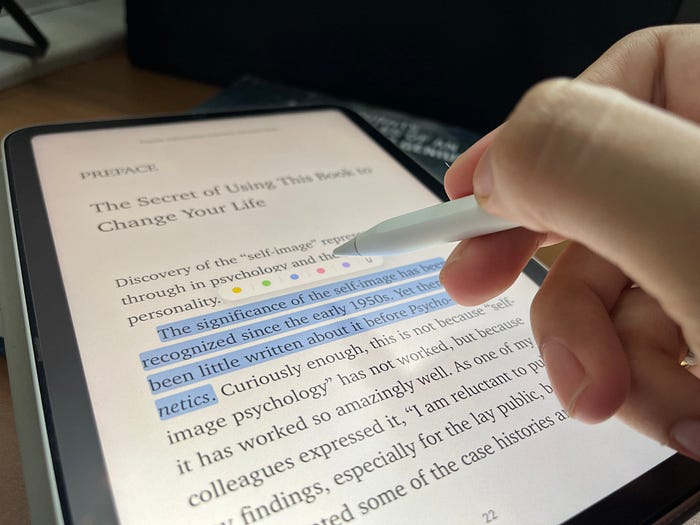
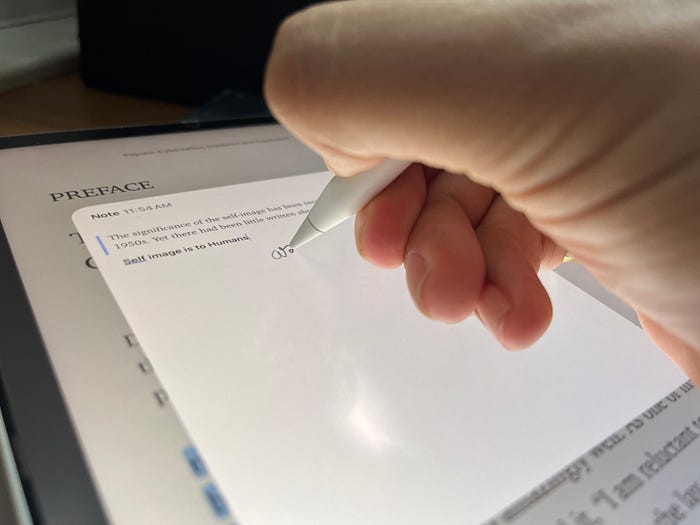
The iPad mini isn't just a standalone device. You can buy a stylus for it and turn it into a note-taking device as you read. Maybe even use it for highlighting. And while we are talking about highlighting, let's keep in mind that the iPad's color display enables color-coded highlights too.
But hey, wait a moment… what if note-taking or highlighting is not a priority for me while reading?
And that precisely is our wildcard — the Genre of the book you are reading.
When you are reading fiction, you won't necessarily want to take many notes or highlight with different colors. But when you are reading non-fiction, note-taking becomes essential. Almost non-negotiable. That's when the iPad's capabilities start to shine.
And that's what my verdict is all about: The Kindle is my go-to choice for all fiction novels when I have to tap-tap-tapevery few seconds to turn pages and read anytime, anywhere comfortably. And when I decide to read a non-fiction, I would pick up the iPad mini along with my Apple Pencil. It's for the times I want to focus and write down my thoughts alongside the author's text and highlight the text in different colors for the different voices it speaks to.
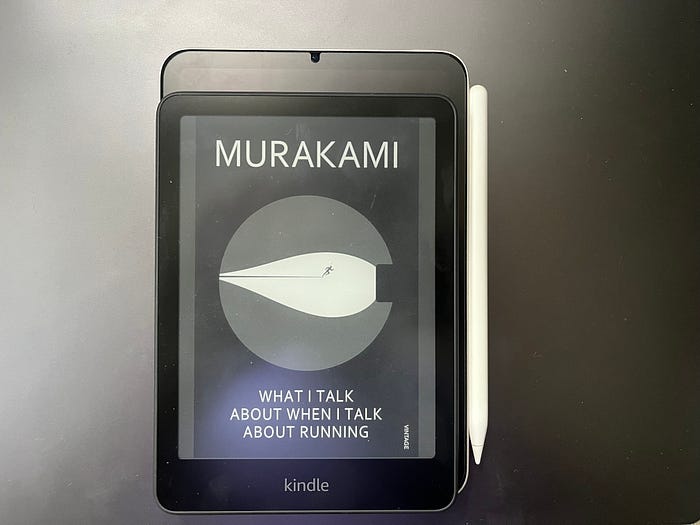

The solution to the feud between the Kindle and iPad mini lies not in ditching any one of them but in figuring out your TBR list — does your list have more fiction or non-fiction books? Choose the iPad over the Kindle if you have more non-fiction books. Choose the Kindle over the iPad if you plan on reading more fiction. That's how I am deciding which device to use for achieving my 2026 reading goal.
Final Thoughts

I cannot give up on either of the two.
As much of an Apple fanboy I am, I cannot imagine going on a vacation without my Kindle (whose got the time to charge the iPad every day?). There are some things that the Kindle gets right without doing much — the e-ink display and battery life being the foremost. But those are not enough for me to let go of the Apple Books experience with the iPad mini and the utility of the Apple Pencil for note-taking and highlighting.
For me, the genre of the book I am reading dictates which device I will pick. The question isn't, 'WHICH device is a better ereader?' but rather 'WHEN does it become the best ereader?'
I hope this story helped you just as much as it helped me come to this realization. Whether you agree or disagree with my verdict or take, I would love to know which device you would favor as an ereader and how it has changed the way you read.
And if you liked this story, you'll probably like the rest of my "real-life Apple experiments" too.
Follow me here on Medium 🙋♂️ for more, and subscribe to my Email Newsletter 📬 if you want the next one delivered without relying on the algorithm.
-Aditya Darekar