

How to wire Ubuntu (Ollama) to Kali (HexStrike) with MCP over SSH, what models actually behaved (Qwen3 8B/14B), and when you should move to GPU or cloud models.
Below is a practical, end-to-end setup that keeps the LLM on Ubuntu (host) and runs HexStrike on Kali (VM), then bridges them so your local model can "drive" HexStrike tool calls.
Additional guides:
- AI-Driven Web Application Pentesting with HexStrike-AI https://medium.com/@1200km/ai-driven-web-application-pentesting-with-hexstrike-ai-67f3dae32040
- AI-Driven Pentesting at Home: Using HexStrike-AI for Full Network Discovery and Exploitation https://medium.com/@1200km/ai-driven-pentesting-at-home-using-hexstrike-ai-for-full-network-discovery-and-exploitation-00a9e88b3bde
- HexStrike on Kali Linux 2025.4: A Comprehensive Guide https://medium.com/@1200km/hexstrike-on-kali-linux-2025-4-a-comprehensive-guide-85a0e5752949
- Integrating Shodan with HexStrike-AI Using Gemini-CLI https://medium.com/@1200km/integrating-shodan-with-hexstrike-ai-using-gemini-cli-b6f9fcbe8e6e
- AI-Driven ZIP Password Recovery with HexStrike-AI and Gemini-CLI https://medium.com/@1200km/ai-driven-zip-password-recovery-with-hexstrike-ai-and-gemini-cli-b8fc5c475ebc
- AI-Driven Wireless Penetration Testing — One Prompt Wi-Fi Cracking https://medium.com/@1200km/ai-driven-wireless-penetration-testing-one-promt-wifi-cracking-6477c06f6af4
Disclaimer (Performance & Practicality)
This setup is functional and stable, but on a CPU-only laptop it can be very slow! On my Dell Latitude 7420 without a discrete GPU, many tool-driven interactions take multiple minutes per command end-to-end (LLM planning → MCP tool invocation → tool output parsing).
Which LLM to use?
I tested several local models; the most reliable for HexStrike MCP tool usage in my environment were ollama:qwen3:14b and ollama:qwen3:8b. Even with these, latency remains the main limitation on CPU-only hardware.
If you want a smooth experience, I strongly recommend trying this architecture on a system with a capable GPU (or a dedicated inference box). For day-to-day productivity right now, I personally still prefer large cloud models (e.g., OpenAI / Gemini) because they are dramatically faster and more consistent for agent-style workflows.
Why use a local LLM for pentesting?
- Closed/air-gapped environments: no internet required for inference
- Sensitive data: you do not send scan outputs, internal hostnames, or credentials to cloud LLMs
- Cost: local inference is effectively free after hardware + power, and avoids per-token costs
0) Target architecture (recommended)
Ubuntu 24.10 (host)
- Local LLM runtime: Ollama (CPU-friendly for a Latitude 7420)
Kali Linux (VM)
- hexstrike_server (local API server, binds to
127.0.0.1:8888by default) (Kali Linux) - hexstrike_mcp (MCP bridge/client pointing at
http://127.0.0.1:8888) (Kali Linux) - SSH enabled (for secure port-forward from Ubuntu to Kali)
Flow Open WebUI (Ubuntu) → (localhost via SSH forward) → mcpo (Kali) → hexstrike_mcp → hexstrike_server → Kali tools
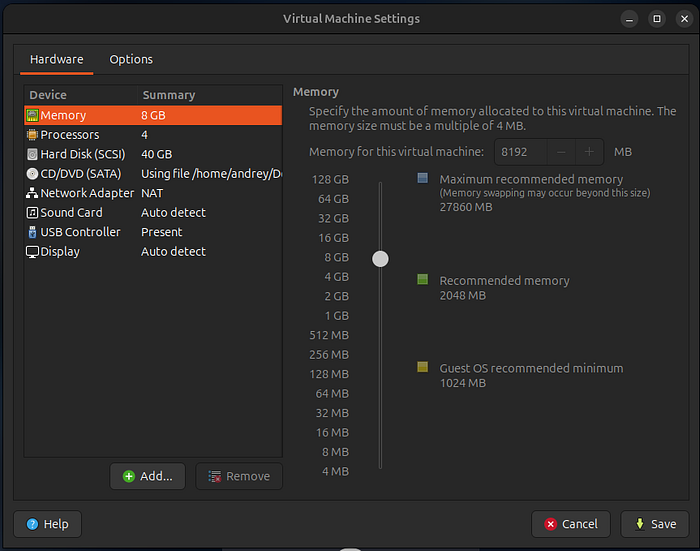
1) VM tuning for Dell Latitude 7420 (performance-first)
Latitude 7420 is typically CPU-bound for local LLMs (often Intel i5/i7 + integrated GPU). Optimize by not starving the host.
Kali VM recommended
- vCPU: 2 (max 3 if you have 32GB RAM and host stays responsive)
- RAM: 6–8 GB
- Disk: 40–60 GB
- Networking: NAT + Host-Only (best balance: Kali gets internet via NAT; Ubuntu can SSH via Host-Only)
Why: HexStrike can run heavy tools; keeping Kali at 2 vCPU prevents it from stealing cycles from the host LLM.
2) Ubuntu (host): install Ollama + pull a model
2.1 Install Ollama
sudo apt update
sudo apt install -y curl
curl -fsSL https://ollama.com/install.sh | sh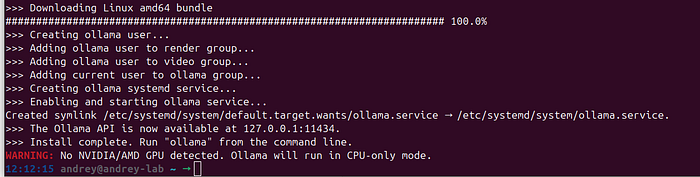
Verify:
ollama --version
2.2 Pull a laptop-friendly model
Pick one primary model to start (faster UX):
Good defaults for a 7420 (CPU):
- 7–8B "instruct" / "coder" model in 4-bit quant (usually best quality/speed tradeoff)
- If you only have 16GB RAM and want more speed: 3B–4B
Example:
ollama pull qwen3:14b
# or smaller:
ollama pull qwen3:8b
Run a quick test:
ollama run qwen3:14b "Explain what nmap -sV does in one paragraph."
2.3 Laptop optimization (recommended defaults)
Ollama supports environment variables to control behavior (parallelism, keep-alive, etc.). אולמה On a 7420-class CPU, you typically want low parallelism and only one model loaded:
export OLLAMA_NUM_PARALLEL=1
export OLLAMA_MAX_LOADED_MODELS=1
export OLLAMA_KEEP_ALIVE=5m
# If you ever need a non-default bind:
# export OLLAMA_HOST=127.0.0.1:11434
You can place these in ~/.bashrc or your systemd service override, depending on how you run Ollama.
3) Kali VM: install and start HexStrike
HexStrike is packaged in Kali as hexstrike-ai with binaries hexstrike_server and hexstrike_mcp. (Kali Linux)
3.1 Install
sudo apt update
sudo apt install -y hexstrike-ai openssh-server python3-venv python3-pip
sudo systemctl enable --now ssh
Confirm tools exist:
hexstrike_mcp -h
hexstrike_server -h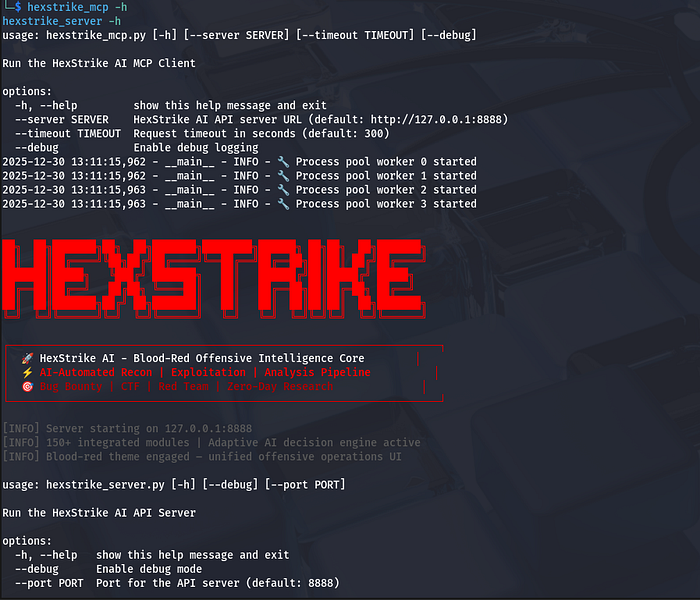
(These flags and defaults are documented in Kali's package page.) (Kali Linux)
3.2 Start HexStrike API server (binds to localhost on Kali)
Run in a dedicated terminal (or tmux):
hexstrike_server --port 8888You should see it start on 127.0.0.1:8888. (Kali Linux)
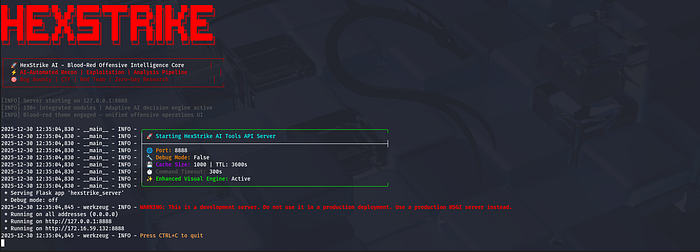
4) Kali VM — Networking + SSH (so Ubuntu can run HexStrike tools inside Kali)
4.1 VM networking recommendation
Use two adapters (VirtualBox/VMware both support this):
- NAT: for Kali internet updates
- Custom : stable IP between Ubuntu ↔ Kali
Inside Kali:
ip a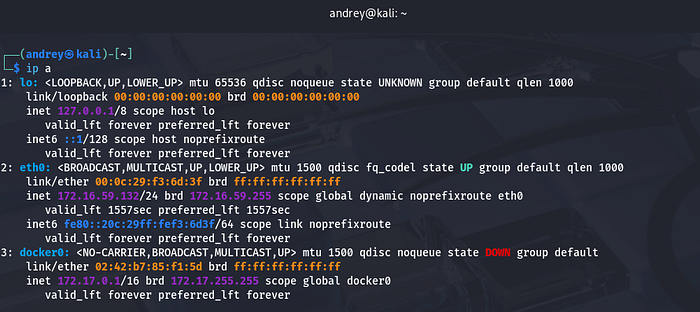
Note the host-only IP (example: 172.16.59.132).
4.2 Enable SSH on Kali
sudo apt update
sudo apt install -y openssh-server
sudo systemctl enable --now ssh
From Ubuntu, confirm SSH works:
ssh [email protected]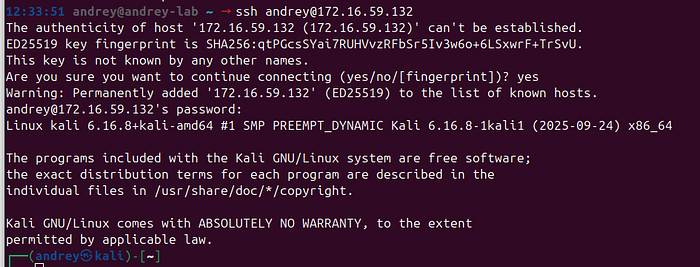
5) Host (Ubuntu) — Install mcphost (terminal MCP host) and wire it to HexStrike
mcphost is a CLI host that supports non-interactive one-shot prompts and Ollama models. GitHub+1
5.1 Install Go + mcphost
mcphost requires Go (1.23+). GitHub
Ubuntu:
sudo apt update
sudo apt install -y golang-go
go install github.com/mark3labs/mcphost@latest
Installation command is documented by the project. GitHub
Ensure it's in PATH:
export PATH="$PATH:$(go env GOPATH)/bin"
mcphost -h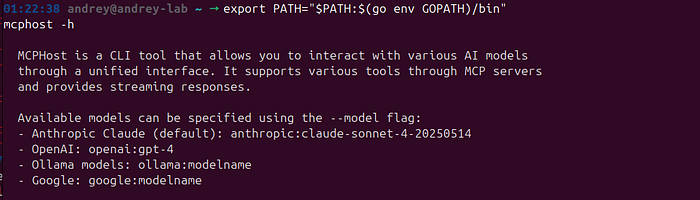
6) SSH key auth (recommended) + prevent SSH banners from breaking MCP stdio
6.1 Set up SSH keys (Ubuntu → Kali)
On Ubuntu:
ssh-keygen -t ed25519 -C "hexstrike-kali" -f ~/.ssh/hexstrike_kali
ssh-copy-id -i ~/.ssh/hexstrike_kali.pub [email protected]
Test:
ssh -i ~/.ssh/hexstrike_kali [email protected] "echo ok"
6.2 Disable MOTD/banner output for this Kali user (important)
MCP stdio can break if the remote shell prints banners/MOTD before the protocol starts.
On Kali (as the andrey user):
touch ~/.hushlogin7) Create the mcphost config to run HexStrike MCP remotely via SSH
mcphost reads ~/.mcphost.yml (preferred) and supports mcpServers with type: local commands, plus optional tool allow/deny lists. GitHub+1
On Ubuntu, create ~/.mcphost.yml:
nano ~/.mcphost.yml
mcpServers:
  hexstrike:
    type: "local"
    command:
      - "ssh"
      - "-i"
      - "${env://HOME}/.ssh/hexstrike_kali"
      - "-o"
      - "BatchMode=yes"
      - "-o"
      - "StrictHostKeyChecking=accept-new"
      - "-o"
      - "LogLevel=ERROR"
      - "[email protected]"
      - "hexstrike_mcp"
      - "--server"
      - "http://127.0.0.1:8888"
      - "--timeout"
      - "300"
# Optional default model (you can also pass -m each time)
model: "ollama:qwen3:14b"
Why this works:
hexstrike_mcpdefaults tohttp://127.0.0.1:8888and supports--timeout. Kali Linux- HexStrike lists common MCP tool names like
nmap_scan(),nuclei_scan(), etc. GitHub mcphostsupports Ollama models and can run in non-interactive mode (-p ... --quiet). GitHub+1
7.1 Test it:
mcphost --debug -m ollama:qwen3:8b
/servers
/tools
8) "Like ollama run …" — one-liner usage from Ubuntu terminal
8.1 Plain LLM (no tools), mcphost one-liner
mcphost --debug -m ollama:qwen3:8b -p '@hexstrike list all available tools'
8.2 Tool-using prompt (HexStrike via MCP)
Give the model a prompt that clearly authorizes scope and requests HexStrike tools: Simplest and fastest function
mcphost --debug -m ollama:qwen3:14b -p '@hexstrike: You must call exactly one tool: hexstrike__nmap_scan. Scan network 192.168.1.0/24. Use minimal flags for speed (no scripts). After the tool returns, output a 2-column table: IP | Open Ports. Do not call any other tools.'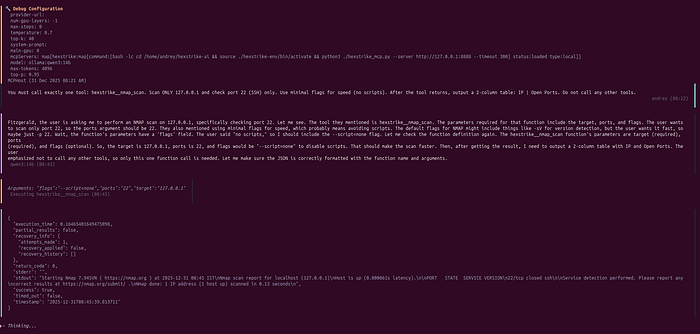
9) Recommended hardening (do this)
9.1 Do not expose HexStrike API on the network
Keep hexstrike_server on loopback (127.0.0.1). Kali package indicates it starts there by default. Kali Linux
You are reaching it via SSH-spawned hexstrike_mcp, so no port-forwarding is needed.
9.2 Use tool filtering once you know tool names
mcphost supports allowedTools / excludedTools per server. GitHub+1
After you've listed tools once, you can restrict what the LLM may invoke.
9.3 Stay current: there has been at least one published HexStrike security advisory
There are public advisories describing command-injection risk paths in HexStrike components (example: GHSA / CVE listings). Use isolation (VM), least privilege, and do not expose the API. nvd.nist.gov+1
Conclusion
HexStrike + a local LLM is absolutely possible — but it is highly hardware-sensitive. On a CPU-only laptop like a Dell Latitude 7420, the workflow is technically functional yet often impractically slow: many "one command" actions can take minutes end-to-end because you pay for the entire loop every time (LLM planning → MCP tool selection → tool execution → parsing → summarization). HexStrike itself is not the bottleneck; local inference and agent reasoning latency is.
There is also a capability gap. Smaller local models can execute tool-driven workflows, but they are typically less "smart" and less consistent than large cloud models: they make more planning mistakes, are more sensitive to tool overload, and more often need stricter prompts, tool allowlists, and guardrails to avoid wasted steps. In other words, you can get it working — but you don't get the same "agent quality" you'll see from top-tier cloud models.
If you want this architecture to feel smooth and productive, you realistically need strong hardware, ideally a capable GPU (or a dedicated inference box). For day-to-day productivity today, large cloud models (OpenAI / Gemini / etc.) remain the fastest and most reliable choice for agent-style workflows. The local setup still has a clear niche — privacy, air-gapped environments, and cost control — but you should go into it with realistic expectations: on basic hardware it will work, but it will feel slow and less intelligent compared to big models.