

Hello everyone, Aman Kumar (ak) here.
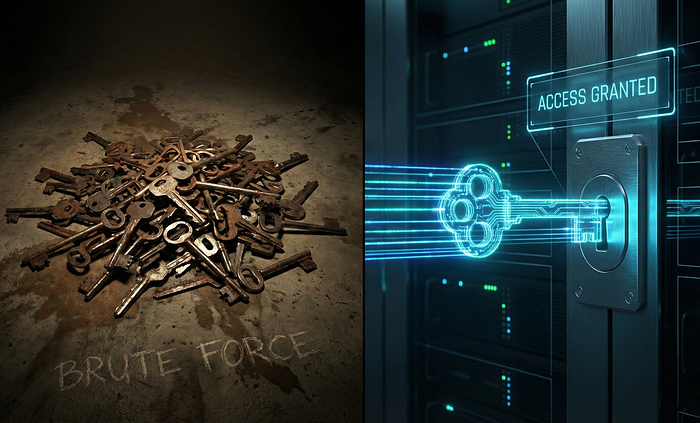
If you are scanning a target with a wordlist of 1 million lines and default settings, you have already lost.
You are noisy, you are slow, and the WAF (Web Application Firewall) blocked your IP 10 minutes ago.
I have been hunting for 5 years, and my process is quite straightforward, nothing too fancy. But the biggest difference between a $0 researcher and a professional is Efficiency. Tools like FFUF (Fuzz Faster U Fool) are powerful, but most people treat them like a blunt hammer.
In this guide, I am going to teach you how to use FFUF like a Scalpel.
We are going to cover everything: Recursion, VHost Discovery, the "Lazy" Request Mode, how to mimic a Browser, and the "Pro" trick of piping results directly into Burp Suite.
Phase 1: The "Garbage In, Garbage Out" Rule
99% of hunters fail because they use the wrong wordlist. If you are fuzzing a Spring Boot application with a PHP wordlist, you are just wasting electricity.
The "Context-Aware" Strategy
Before I run ffuf, I create a custom wordlist based on the target itself. I use a tool called CeWL to scrape the website and generate a list of words that the developers actually use.
cewl -d 2 -m 5 https://target.com -w target_dict.txt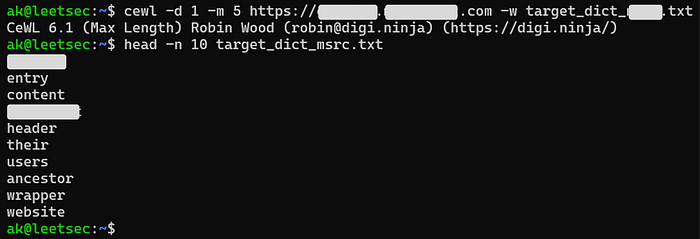
- Why this works: Developers are lazy. They use the same naming conventions for variables and endpoints. If the homepage talks about "Invoices," there is a high chance of an
/api/invoiceendpoint existing.
The Secret Sauce: Wordlists
You can have the best engine (FFUF), but if you put bad fuel in it, it won't run. Everyone uses SecLists. It's great, but it's old.
If you want to find bugs in 2025, check out Assetnote Wordlists. They are generated automatically from the entire internet every month. They are smaller, faster, and find more hits.
- My Go-To:
automated/httparchive_apiroutes_2025.txt
Phase 2: Directory Discovery (The Smart Way)
This is the most common use case, but 90% of people do it wrong because of False Positives.
The "Auto-Calibrate" Flag (-ac)
Many servers return a 200 OK for every request (Soft 404). This breaks standard scanners.
- The Fix: Always use
-ac. FFUF will send random strings to gauge the server's behavior and automatically hide "garbage" responses.
The "Extension" Strategy (-e)
Don't guess extensions. Define them based on the tech stack (Wappalyzer).
ffuf -u https://target.com/FUZZ -w wordlist.txt -e .php,.html,.bak -acAdvanced Filtering (-fs)
Sometimes, -fc 403 isn't enough. You might get thousands of 200 OK responses that are just the "Login Page" over and over.
- Look at the results. Note the Size (e.g., 1234 bytes).
- Filter by size:
-fs 1234. - Now, you only see the unique pages.
Phase 3: The "Deep" Scan (Recursion)
This is a feature most beginners ignore, but it saves so much time.
Imagine you are scanning target.com. You find a directory called /backup.
- The Amateur: Stops the scan, types a new command for
target.com/backup, runs it again. - The Pro: Uses
-recursion.
This flag tells FFUF: "If you find a directory, don't ask me. Just go inside and start scanning immediately."
ffuf -u https://target.com/FUZZ -w wordlist.txt -recursion -recursion-depth 2 -ac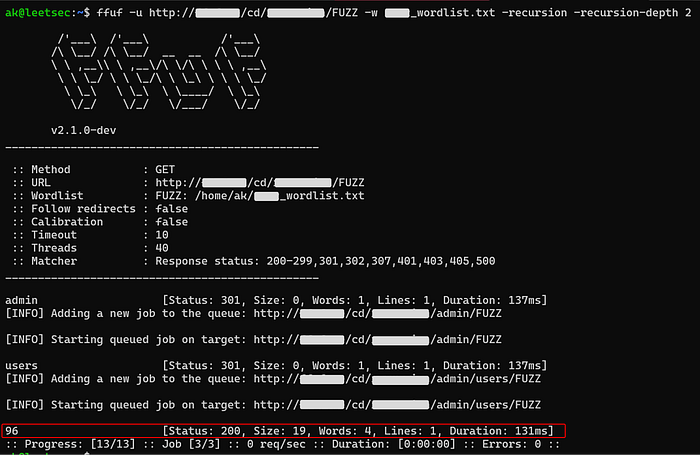
The Big Question: Why only Depth 2? I know what you are thinking: "If 2 is good, why not use 5? Wouldn't I find more bugs?" No. You will crash your scanner.
- Depth 1: Scans
target.com/admin(1k requests). - Depth 2: Scans
target.com/admin/config(finds 10 folders -> 10k requests). - Depth 5: This creates an exponential explosion. You aren't just scanning a house anymore; you are scanning every drawer in every desk in every room.
Phase 4: The Hidden Attack Surface (VHost Fuzzing)
This is where the money is.
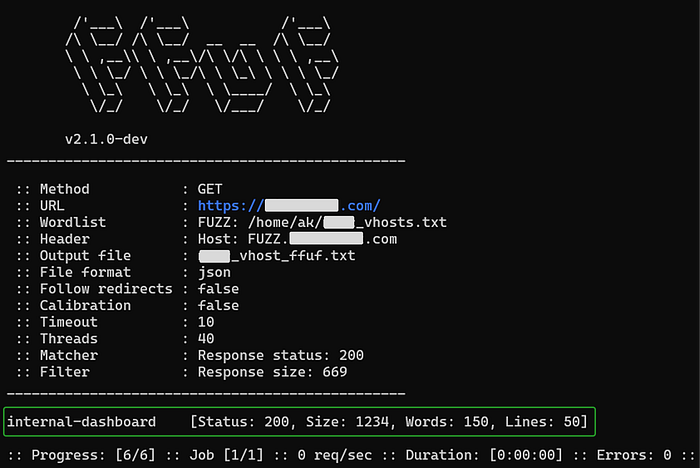
Sometimes, a developer sets up a subdomain (e.g., dev.target.com) that isn't in public DNS records. You can't find it with Subfinder or Amass. You have to find it by fuzzing the Host Header.
The Command:
ffuf -u https://target.com -w subdomains.txt -H "Host: FUZZ.target.com" -mc 200 -fs 669- How it works: We hit the main IP, but we change the
Hostheader in every request. - The Trick: Use
-fs(Filter Size) here. The main site will have a specific size (e.g., 5000 bytes). If you find a response that is 200 bytes, you found a hidden internal panel.
Phase 5: The "Clusterbomb" (How to Crack Logins)
Most guides skip this because it's "too complex." But this is how you find Account Takeovers.
Standard fuzzing replaces one word (FUZZ). Clusterbomb fuzzing replaces two words at the same time.
Think of a bicycle lock with 4 numbers. If you try 0000, 0001, 0002… that is standard fuzzing. Clusterbomb is like trying every combination of Username AND Password simultaneously.
The Command:
ffuf -u https://target.com/login \
     -X POST \
     -d "username=USER&password=PASS" \
     -w usernames.txt:USER \
     -w passwords.txt:PASS \
     -mode clusterbomb \
-fc 200usernames.txt:USER: Tells FFUF to put the first wordlist here.passwords.txt:PASS: Tells FFUF to put the second wordlist here.-mode clusterbomb: Tries every username with every password.
Phase 6: Fuzzing APIs (JSON & POST)
Modern web apps don't use URL parameters (id=1). They use JSON ({"id": 1}). If you don't know how to fuzz JSON, you are missing 50% of the internet.
The Command:
ffuf -u https://api.target.com/user/update \
     -X POST \
     -H "Content-Type: application/json" \
     -d '{"user_id": "FUZZ", "role": "admin"}' \
     -w ids.txt \
-mc 200- The Sudoaman Tip: You can put the
FUZZkeyword anywhere. Headers, Cookies, JSON values, or even the API version number (/vFUZZ/users).
Phase 7: The "Lazy" Request Mode (For Complex Auth)
Typing out 10 different headers (-H "Cookie: ..." -H "Auth: ...") is painful and prone to typos.
There is a better way.
- Capture the request in Burp Suite.
- Right-click -> Copy to file (Save it as
req.txt). - Open the file and replace the value you want to test with
FUZZ.
The Request File (req.txt):
POST /api/login HTTP/1.1
Host: target.com
Cookie: session=12345
Content-Type: application/json

{"password": "FUZZ"}
The Command:
ffuf -request req.txt -request-proto http -w passwords.txt -mc 200This is the cleanest, most better way to fuzz authenticated endpoints.
Phase 8: Advanced Filtering (When 403s Lie)
I wrote a whole article about how a 403 error led to a Microsoft bounty. But sometimes, a 403 is just noise.
The "Auto-Calibrate" Rule (-ac) Never run a scan without -ac. It tells FFUF to send nonsense requests first to learn what a "fail" looks like. It filters out 99% of false positives automatically.
The "Filter Line" Rule (-fl) If -fs (Filter Size) isn't working because the page size keeps changing (due to timestamps or tokens), switch to Filter Lines. Usually, the number of lines in an error page stays static even if the bytes change.
ffuf ... -fl 30Phase 9: WAF Evasion (Looking Like a Browser)
This is why most beginners get blocked.
This is why most beginners get blocked. By default, FFUF screams "I AM A BOT" in the User-Agent header. You need to dress it up to look like a normal Chrome browser.
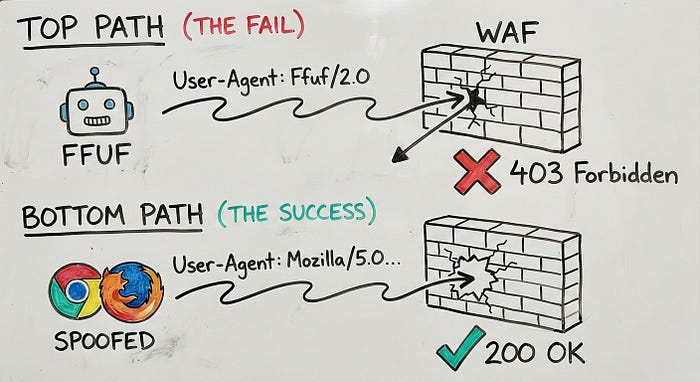
1. Spoof the User-Agent Use the -H flag to send a legitimate browser signature.
-H "User-Agent: Mozilla/5.0 (Windows NT 10.0; Win64; x64) AppleWebKit/537.36 (KHTML, like Gecko) Chrome/120.0.0.0 Safari/537.36"2. Slow Down Speed kills. If you send 5,000 requests per second, the WAF will ban your IP. Use -rate to mimic a (very fast) human.
ffuf ... -rate 200Phase 10: The "One-Liner of Doom" (Chaining)
This is the workflow that gets me paid while I sleep. I use Linux pipes (|) to send the output of FFUF directly into Nuclei (a vulnerability scanner).
The Command:
ffuf -u https://target.com/FUZZ -w wordlist.txt -mc 200 -s | \
httpx -silent | \
nuclei -t cves/ -o vulnerabilities.txt-s(Silent Mode): Crucial. It removes the FFUF banner so the next tool doesn't crash.

Phase 11: The "Pro" Move (Burp Suite Integration)
I love the terminal, but I need a GUI to verify the bug. Instead of copying and pasting URLs, I pipe FFUF traffic directly into my Burp Suite.
ffuf -u https://target.com/FUZZ -w wordlist.txt -replay-proxy http://127.0.0.1:8080Now, every valid finding appears in my Burp "Target" tab, ready for manual exploitation (Repeater).
Phase 12: Making it Look Pretty (HTML Reports)
You found the bugs. Now, how do you show them to a client? Screenshotting a terminal looks messy.
FFUF can generate a clean HTML report that you can open in your browser.
ffuf -u https://target.com/FUZZ -w wordlist.txt -of html -o report.html-of: Output Format.-o: Output Filename.
Phase 13: Save Your Config (.ffufrc)
Tired of typing User-Agent and Color flags every single time? Create a configuration file in your home directory: ~/.ffufrc.
[general]
colors = true
threads = 40
[http]
headers = "User-Agent: Mozilla/5.0 (Windows NT 10.0; Win64; x64) Chrome/120.0.0.0"
proxy = "http://127.0.0.1:8080"
Now FFUF loads these defaults every time. Work smarter, not harder.
Conclusion: The "Sudoaman" Methodology
Tools don't find bugs. Humans do. FFUF is just the messenger.
- Shotgun Approach: Massive wordlists, no filters, default User-Agent (Get blocked).
- Sniper Approach: Assetnote wordlists, recursion depth 2, and Request Mode (Get Bounties).
I used this exact "Sniper" methodology to find the Duplicate Microsoft Vulnerability by fuzzing just 20 words.
Stop doing the donkey work. Use your brain. Make your methodology more better by using logic, not just bandwidth.
Want to hack more?
I am building LeetSec, a collective for the breakers and defenders. We don't post fluff; we post payloads.
1. Follow the Publication so you don't miss the next guide. 2. Connect: LinkedIn | X (Twitter) | Instagram
(P.S. If this guide helped you configure your tools, hold the clap button. It helps other hackers find this resource.)