

Automation doesn't find bugs. Automated workflows combined with manual validation do. While beginners waste time running Nuclei on random targets hoping for critical findings, experienced hunters are building intelligent pipelines that continuously monitor 1,000+ targets, detect configuration changes in real-time, and alert them only when high-value vulnerabilities emerge. Here's exactly how they do it — using only free, open-source tools.
TL;DR — Key Takeaways
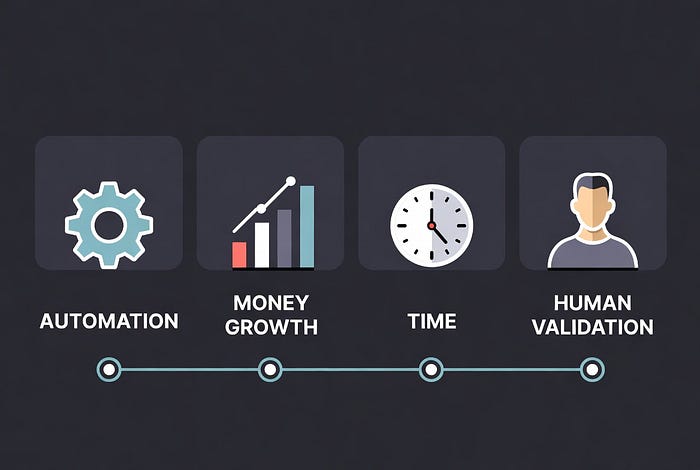
- Automation alone won't make you rich: Top hunters use automation for reconnaissance and continuous monitoring, but manual analysis finds the high-value bugs
- The complete stack costs $0–50/month: All tools are open-source; infrastructure costs are your only expense (VPS, cloud computing)
- Realistic earnings timeline: Months 1–6 building the system ($0 earned), Months 7–18 optimizing workflows ($100–500/month), Year 2+ with mature system ($1000–10,000+/month)
- The 60/40 rule: Successful hunters automate 60% of reconnaissance and monitoring, spend 40% on manual testing and validation
Critical mindset shift: Automation finds opportunities; humans find vulnerabilities
Why Automation Matters (And Why It's Not Enough)
The Brutal Math of Modern Bug Bounty
Consider these statistics:
- Popular programs receive 10,000+ reports annually with only 6% acceptance rates (Meta 2024 data)
- Time-to-duplicate on public programs: 2–4 hours for common vulnerabilities
- Average reconnaissance time per target manually: 8–12 hours
- Number of in-scope assets for large programs: 500–5,000+ domains
The problem: You're competing against hundreds of hunters, many running 24/7 automated reconnaissance. Without automation, you're always late to the party.
The reality: As one experienced hunter who earned over $20,000 in a year through automation noted, they found vulnerabilities in targets that traditional manual methods would have taken weeks to assess comprehensively.
What Automation Actually Does
Automation handles the repetitive, time-consuming tasks:
✅ Continuous subdomain monitoring across 50+ programs ✅ Automatic detection when new assets come online ✅ Technology stack fingerprinting ✅ Port and service enumeration ✅ JavaScript endpoint extraction ✅ Certificate transparency monitoring ✅ Historical data collection from archives ✅ Pattern matching for known misconfigurations
What automation CANNOT do well:
Understand business logic ❌ Chain vulnerabilities creatively ❌ Test complex authentication flows ❌ Identify subtle IDOR patterns ❌ Analyze application-specific security flaws ❌ Validate findings (reduce false positives)❌
As one successful hunter puts it: "60% of my workflow is automated using custom scripts that continuously scan for bugs across public engagements. But automation isn't just about running scripts — it's about running them smartly."
The Complete Automation Architecture
Here's the full stack used by hunters generating consistent five and six-figure incomes:
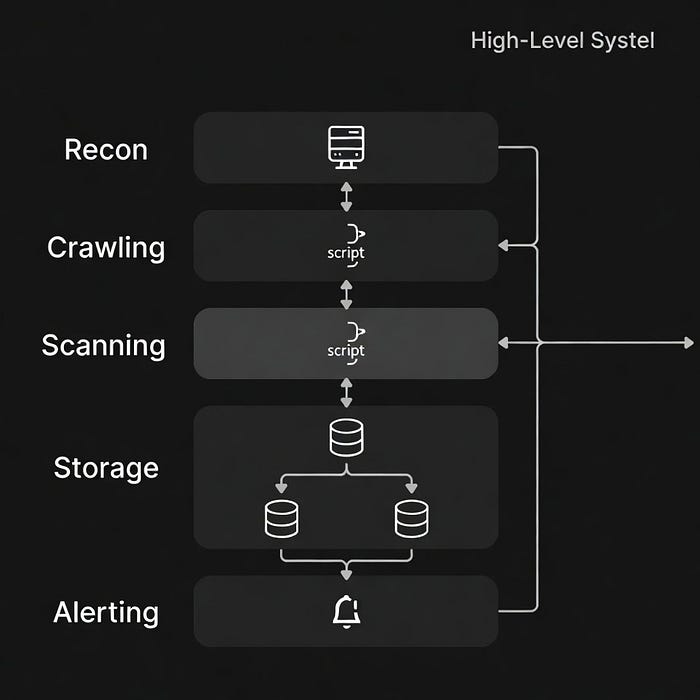
Layer 1: Scope Management & Program Selection
Tools:
- bounty-targets-data (GitHub repository)
- Hourly-updated dumps of all major platform scopes
- HackerOne, Bugcrowd, Intigriti, YesWeHack
- Automatically pulls in-scope domains
Installation:
git clone https://github.com/arkadiyt/bounty-targets-data.git
cd bounty-targets-data
# Data updates hourly via GitHub Actions
Why it matters: Instead of manually checking 50+ programs daily, this automatically tracks scope changes. When a company adds wildcards or new domains, you're notified immediately.
Custom workflow example:
# Extract all wildcard scopes from HackerOne
cat data/hackerone_data.json | jq -r '.[] | select(.offers_bounties==true) | .target
This command extracts wildcard URL domains from bounty-paying HackerOne programs and saves them for recon.
Layer 2: Subdomain Discovery (The Foundation)
This is where automation shines. Multiple tools aggregating data from different sources.
Primary Tools:
1. Subfinder (ProjectDiscovery)
# Installation
go install -v github.com/projectdiscovery/subfinder/v2/cmd/subfinder@latest
# Basic usage
subfinder -d example.com -all -recursive -o subdomains.txt
# Advanced: Use all sources with API keys
subfinder -d example.com -all -cs -o subs.txt
Pro configuration (~/.config/subfinder/provider-config.yaml):
shodan: [YOUR_API_KEY]
censys: [YOUR_API_ID:YOUR_SECRET]
virustotal: [YOUR_API_KEY]
github: [YOUR_GITHUB_TOKEN]
securitytrails: [YOUR_API_KEY]
2. Amass (OWASP Project)
# Installation
go install -v github.com/owasp-amass/amass/v4/...@master
# Advanced enumeration with data sources
amass enum -passive -d example.com -config ~/.config/amass/config.ini -o amass_out.txt
# Active enumeration (when in scope)
amass enum -active -d example.com -brute -w wordlist.txt -o amass_active.txt
3. Assetfinder (tomnomnom)
go install github.com/tomnomnom/assetfinder@latest
assetfinder --subs-only example.com > assetfinder_out.txt
4. Chaos (ProjectDiscovery)
# Access Project Discovery's Chaos dataset
chaos -d example.com -key YOUR_API_KEY -o chaos_out.txt
1️⃣ These tools automatically find subdomains of a target domain (like api.example.com, dev.example.com) using public data sources.
2️⃣ Each tool pulls data from different places (DNS, search engines, APIs, cert logs), so using all of them gives maximum coverage.
3️⃣ The output files (subdomains.txt, amass_out.txt, etc.) are used as the base recon list for further testing (alive check, scanning, exploitation).
The Power of Aggregation:
One experienced hunter shared their subdomain enumeration workflow that combines multiple tools:
#!/bin/bash
domain=$1
# Run multiple tools in parallel
subfinder -d $domain -silent | tee -a all_subs.txt &
amass enum -passive -d $domain -o amass.txt &
assetfinder --subs-only $domain | tee -a all_subs.txt &
# Wait for all to complete
wait
# Merge and deduplicate
cat all_subs.txt amass.txt | sort -u > unique_subs.txt
# Generate subdomain permutations
cat unique_subs.txt | dnsgen - | massdns -r resolvers.txt -t A -o J --flush -w massdns_out.json
Why multiple tools? Each tool uses different data sources. Subfinder might find 200 subdomains, Amass finds 180 (with 50 unique), Assetfinder adds 30 more. The aggregation gives you 260+ unique subdomains vs 200 from one tool alone.
Layer 3: Asset Probing & Discovery
1. httpx (ProjectDiscovery)
# Installation
go install -v github.com/projectdiscovery/httpx/cmd/httpx@latest
# Basic probing
cat subdomains.txt | httpx -silent -o live_hosts.txt
# Advanced: Get titles, status codes, tech stack
cat subdomains.txt | httpx -silent -title -status-code -tech-detect -follow-redirects -o httpx_results.txt
# Screenshot capabilities
cat subdomains.txt | httpx -silent -screenshot -o screenshots/
2. httprobe (tomnomnom)
go install github.com/tomnomnom/httprobe@latest
cat subdomains.txt | httprobe -c 50 > live_urls.txt
Pro tip: httpx is more feature-rich and actively maintained. It can detect technologies (Wappalyzer-style) and extract useful metadata in one pass.
Layer 4: Content Discovery & Crawling
1. Katana (ProjectDiscovery)
# Installation
go install github.com/projectdiscovery/katana/cmd/katana@latest
# Crawl with depth
katana -u https://example.com -d 5 -jc -kf all -o katana_results.txt
# Crawl multiple URLs
cat live_urls.txt | katana -d 3 -jc -aff -o crawled_endpoints.txt
2. waybackurls (tomnomnom)
go install github.com/tomnomnom/waybackurls@latest
# Fetch historical URLs
echo "example.com" | waybackurls > wayback_urls.txt
3. gau (Get All URLs — lc)
go install github.com/lc/gau/v2/cmd/gau@latest
# Aggregate URLs from multiple sources
echo "example.com" | gau --blacklist png,jpg,gif,css --threads 5 > gau_urls.txt
4. hakrawler (hakluke)
go install github.com/hakluke/hakrawler@latest
echo "https://example.com" | hakrawler -depth 3 -plain -usewayback -o hakrawler_out.txt
Why it matters: A hunter analyzed that combining waybackurls, gau, and active crawling with Katana can reveal 3–5x more endpoints than crawling alone. Old API endpoints from 2019? Still accessible and often unpatched.
Layer 5: JavaScript Analysis
1. LinkFinder (GerbenJavado)
# Installation
git clone https://github.com/GerbenJavado/LinkFinder.git
cd LinkFinder
pip3 install -r requirements.txt
# Find endpoints in JS files
python3 linkfinder.py -i https://example.com/app.js -o results.html
2. JSFinder (Threezh1)
# Installation
go install github.com/Threezh1/JSFinder@latest
# Extract endpoints from JS
echo "https://example.com" | JSFinder -output js_endpoints.txt
3. SecretFinder (m4ll0k)
# Installation
git clone https://github.com/m4ll0k/SecretFinder.git
cd SecretFinder
pip3 install -r requirements.txt
# Find API keys, tokens in JS
python3 SecretFinder.py -i https://example.com/app.js -o secrets_output.html
Real-world impact: One researcher found AWS keys exposed in JavaScript files that led to full S3 bucket access — $15,000 bounty. JS analysis is often overlooked by automated scanners.
Layer 6: Vulnerability Scanning
1. Nuclei (ProjectDiscovery)
# Installation
go install -v github.com/projectdiscovery/nuclei/v3/cmd/nuclei@latest
# Update templates
nuclei -update-templates
# Basic scan
nuclei -l live_urls.txt -o nuclei_results.txt
# Severity-based scanning
nuclei -l live_urls.txt -severity critical,high -o critical_bugs.txt
# Custom templates
nuclei -l targets.txt -t ~/nuclei-templates/custom/ -o custom_scan.txt
Pro configuration: Create a custom workflow with high-value templates:
# Focus on misconfigurations and exposures
nuclei -l urls.txt \
  -t nuclei-templates/exposures/ \
  -t nuclei-templates/misconfiguration/ \
  -t nuclei-templates/vulnerabilities/ \
  -severity high,critical \
  -o high_value_findings.txt
2. Ffuf (Fuzzing tool)
# Installation
go install github.com/ffuf/ffuf/v2@latest
# Directory fuzzing
ffuf -u https://example.com/FUZZ -w wordlist.txt -mc 200,301,302,401,403 -o ffuf_results.json
# Virtual host discovery
ffuf -u https://example.com -H "Host: FUZZ.example.com" -w subdomains.txt -mc 200
# Parameter fuzzing
ffuf -u https://example.com/api?FUZZ=value -w params.txt -mc 200
3. Dalfox (XSS Scanner)
# Installation
go install github.com/hahwul/dalfox/v2@latest
# Scan for XSS
dalfox url https://example.com/search?q=test
# Pipe from other tools
cat live_endpoints.txt | grep "=" | dalfox pipe -o xss_findings.txt
Layer 7: Data Storage & Organization
Critical component: Store all data obtained from various tools in the previous layer in a database for querying and correlation.
Option 1: hakstore (hakluke)
# PostgreSQL-based storage for bug bounty data
git clone https://github.com/hakluke/hakstore.git
# Setup PostgreSQL database
# Configure connection and store all findings
Option 2: Custom database schema
-- Programs table
CREATE TABLE programs (
    id SERIAL PRIMARY KEY,
    name VARCHAR(255),
    platform VARCHAR(50),
    scope TEXT,
    last_updated TIMESTAMP
);
-- Subdomains table
CREATE TABLE subdomains (
    id SERIAL PRIMARY KEY,
    program_id INT REFERENCES programs(id),
    subdomain VARCHAR(255),
    ip_address VARCHAR(45),
    status_code INT,
    discovered_date TIMESTAMP,
    last_checked TIMESTAMP
);
-- Findings table
CREATE TABLE findings (
    id SERIAL PRIMARY KEY,
    program_id INT REFERENCES programs(id),
    subdomain_id INT REFERENCES subdomains(id),
    vulnerability_type VARCHAR(100),
    severity VARCHAR(20),
    description TEXT,
    poc TEXT,
    reported BOOLEAN,
    bounty_amount DECIMAL,
    created_at TIMESTAMP
);
Layer 8: Notification & Alerting
Slack Integration:
import requests
import json
def send_slack_notification(webhook_url, vulnerability):
    payload = {
        "text": f"🚨 New Finding Detected!",
        "attachments": [{
            "color": "danger",
            "fields": [
                {"title": "Type", "value": vulnerability['type'], "short": True},
                {"title": "Severity", "value": vulnerability['severity'], "short": True},
                {"title": "Target", "value": vulnerability['url'], "short": False},
                {"title": "Description", "value": vulnerability['description'], "short": False}
            ]
        }]
    }
    requests.post(webhook_url, data=json.dumps(payload))
Telegram Bot:
import telebot
bot = telebot.TeleBot("YOUR_BOT_TOKEN")
def alert_finding(chat_id, finding):
    message = f"""
🎯 New Vulnerability Found!
Type: {finding['type']}
Severity: {finding['severity']}
Target: {finding['url']}
Time: {finding['timestamp']}
    """
    bot.send_message(chat_id, message)
This code automatically sends you a message on Slack or Telegram when your bug bounty automation finds a vulnerability.
Instead of checking logs manually, you get an instant alert with target, severity, and issue details.
Example: if your scan finds SQL Injection on login.example.com, you instantly get a Slack/Telegram message saying "High severity bug found on this URL" 🚨
The Complete Automation Workflow (Real Implementation)
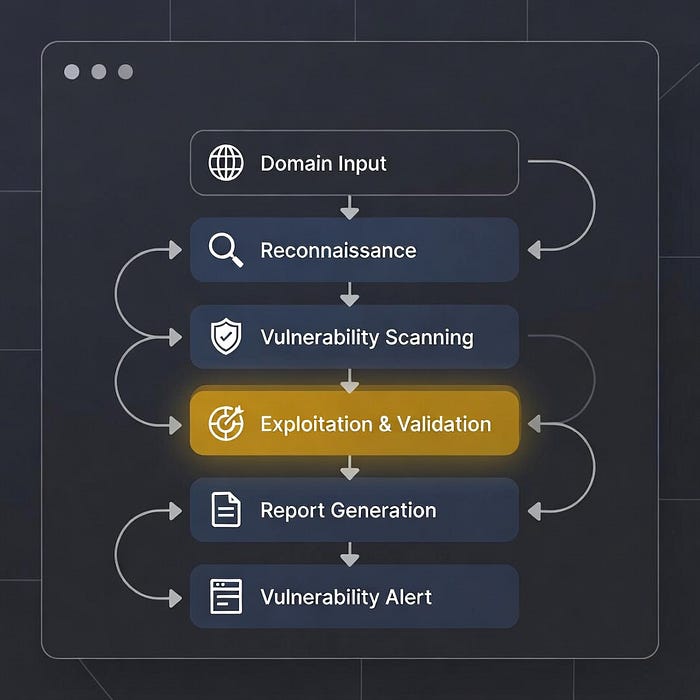
Here's a production-ready bash script that ties everything together:
#!/bin/bash
# Bug Bounty Automation Pipeline
# Usage: ./recon.sh example.com
domain=$1
output_dir="recon_${domain}_$(date +%Y%m%d)"
mkdir -p $output_dir
echo "[*] Starting reconnaissance for $domain"
# Step 1: Subdomain Enumeration
echo "[*] Phase 1: Subdomain Discovery"
subfinder -d $domain -all -silent -o $output_dir/subfinder.txt &
amass enum -passive -d $domain -o $output_dir/amass.txt &
assetfinder --subs-only $domain > $output_dir/assetfinder.txt &
wait
# Merge and deduplicate
cat $output_dir/subfinder.txt $output_dir/amass.txt $output_dir/assetfinder.txt | sort -u > $output_dir/all_subdomains.txt
echo "[+] Found $(wc -l < $output_dir/all_subdomains.txt) unique subdomains"
# Step 2: Subdomain Permutation
echo "[*] Phase 2: Generating permutations"
cat $output_dir/all_subdomains.txt | dnsgen - | massdns -r resolvers.txt -t A -o J --flush 2>/dev/null | grep -oP '(?<=")[^"]+(?=")' | sort -u > $output_dir/resolved_subs.txt
echo "[+] Resolved $(wc -l < $output_dir/resolved_subs.txt) subdomains"
# Step 3: HTTP Probing
echo "[*] Phase 3: Probing for live hosts"
cat $output_dir/resolved_subs.txt | httpx -silent -title -status-code -tech-detect -o $output_dir/live_hosts.txt
echo "[+] Found $(wc -l < $output_dir/live_hosts.txt) live hosts"
# Step 4: URL Discovery
echo "[*] Phase 4: URL and endpoint discovery"
cat $output_dir/live_hosts.txt | awk '{print $1}' | waybackurls > $output_dir/wayback.txt
cat $output_dir/live_hosts.txt | awk '{print $1}' | gau --blacklist png,jpg,gif,css > $output_dir/gau.txt
cat $output_dir/live_hosts.txt | awk '{print $1}' | katana -d 3 -jc -o $output_dir/katana.txt
# Merge all URLs
cat $output_dir/wayback.txt $output_dir/gau.txt $output_dir/katana.txt | sort -u > $output_dir/all_urls.txt
echo "[+] Collected $(wc -l < $output_dir/all_urls.txt) unique URLs"
# Step 5: Vulnerability Scanning
echo "[*] Phase 5: Vulnerability scanning"
nuclei -l $output_dir/all_urls.txt -severity critical,high -o $output_dir/nuclei_findings.txt -silent
# Check if any critical/high findings
if [ -s $output_dir/nuclei_findings.txt ]; then
    echo "[!] CRITICAL/HIGH vulnerabilities found!"
    # Send notification
    python3 notify.py --file $output_dir/nuclei_findings.txt --domain $domain
else
    echo "[*] No critical/high vulnerabilities found"
fi
# Step 6: Generate report
echo "[*] Generating summary report"
echo "=== Reconnaissance Report for $domain ===" > $output_dir/report.txt
echo "Date: $(date)" >> $output_dir/report.txt
echo "Subdomains: $(wc -l < $output_dir/all_subdomains.txt)" >> $output_dir/report.txt
echo "Live Hosts: $(wc -l < $output_dir/live_hosts.txt)" >> $output_dir/report.txt
echo "URLs: $(wc -l < $output_dir/all_urls.txt)" >> $output_dir/report.txt
echo "Findings: $(wc -l < $output_dir/nuclei_findings.txt)" >> $output_dir/report.txt
echo "[+] Reconnaissance complete! Results in $output_dir/"
This script automatically does full bug bounty recon for a domain: finds subdomains → checks which are live → collects URLs → scans for high-risk bugs → alerts you.
Example: you run ./recon.sh example.com and it discovers dev.example.com, finds it live, pulls hidden URLs, and scans them with Nuclei.
If a critical or high bug (like exposed admin or SQLi) is found, it notifies you and creates a clean report folder with all results. 🚀
Continuous monitoring version (runs every 24 hours):
#!/bin/bash
# continuous_monitor.sh
programs=("example1.com" "example2.com" "example3.com")
while true; do
    for domain in "${programs[@]}"; do
        echo "[*] Scanning $domain at $(date)"

        # Run reconnaissance
        ./recon.sh $domain

        # Compare with previous results
        if [ -f "previous_results/${domain}_urls.txt" ]; then
            # Find new URLs
            comm -13 <(sort previous_results/${domain}_urls.txt) <(sort recon_${domain}_*/all_urls.txt) > new_urls_${domain}.txt

            if [ -s new_urls_${domain}.txt ]; then
                echo "[!] Found $(wc -l < new_urls_${domain}.txt) new URLs for $domain"
                # Scan only new URLs
                nuclei -l new_urls_${domain}.txt -severity critical,high -o new_findings_${domain}.txt
            fi
        fi

        # Update previous results
        mkdir -p previous_results
        cp recon_${domain}_*/all_urls.txt previous_results/${domain}_urls.txt
    done

    # Sleep for 24 hours
    echo "[*] Sleeping for 24 hours..."
    sleep 86400
done
This script automatically re-runs your recon every 24 hours to find new subdomains or URLs added by the target.
Example: today example.com has 500 URLs, tomorrow it finds 20 new ones and only scans those new URLs for high/critical bugs.
You run it with bash continuous_monitor.sh, and it keeps running in the background like a 24/7 bug bounty watchman 🕵️♂️🔥
Scaling Infrastructure (The $0–50/Month Setup)
Option 1: Single VPS (Beginner)
Cost: $5–20/month
Use a single DigitalOcean/Linode/Vultr VPS:
- 2–4 CPU cores
- 4–8GB RAM
- 80–160GB storage
- Ubuntu 22.04 LTS
Setup:
# Install all tools
sudo apt update && sudo apt upgrade -y
sudo apt install -y git curl wget python3 python3-pip golang-go
# Install Go tools
export GOPATH=$HOME/go
export PATH=$PATH:$GOPATH/bin
# Install all reconnaissance tools
go install -v github.com/projectdiscovery/subfinder/v2/cmd/subfinder@latest
go install -v github.com/owasp-amass/amass/v4/...@master
go install -v github.com/projectdiscovery/httpx/cmd/httpx@latest
go install -v github.com/projectdiscovery/nuclei/v3/cmd/nuclei@latest
# ... etc
# Set up cron for automation
crontab -e
# Add: 0 2 * * * /home/user/continuous_monitor.sh >> /var/log/recon.log 2>&1
Option 2: Distributed System (Intermediate/Advanced)
Cost: $20–50/month
Use Axiom for distributed scanning:
# Install Axiom
bash <(curl -s https://raw.githubusercontent.com/attacks# Configure cloud provider (DigitalOcean, Linode, etc.)
axiom-configure
# Spin up instances
axiom-init hunters 10
# Distributed subdomain enumeration
axiom-scan domains.txt -m subfinder -o subdomains.txt
# Distributed httpx probing
axiom-scan subdomains.txt -m httpx -o live_hosts.txt
# Distributed nuclei scanning
axiom-scan urls.txt -m nuclei -o findings.txturge/ax/master/interact/axiom-configure) --run
Real earnings example: One hunter using Axiom setup (10–20 cloud instances) found a critical vulnerability through automated reconnaissance that paid $2,000. The infrastructure cost for that month? $30.
Option 3: Advanced Pipeline (Kubernetes)
For hunters managing 50+ programs simultaneously, Kubernetes offers:
- Auto-scaling workers
- Job queuing
- Resource management
- Cost optimization
Tools: Argo Workflows, Argo Events, AWS EKS or DigitalOcean Kubernetes
A researcher documented building Bugshop, a Kubernetes-based automation framework. While complex to set up, it enables enterprise-grade bug bounty automation that can process hundreds of targets simultaneously.
The Reality Check: Earnings Timeline
Month 1–3: Building Phase ($0 earned)
Focus: Setup infrastructure, test tools, build workflows
Time investment: 20–30 hours/week
Costs: $5–20/month (VPS)
Activities:
- Install and configure all tools
- Test on practice targets (DVWA, PortSwigger, etc.)
- Write automation scripts
- Set up database and storage
- Configure notifications
Month 4–6: Testing Phase ($0–500 earned)
Focus: Run automation on real programs, validate findings
Time investment: 15–25 hours/week
Costs: $10–30/month (VPS + API keys)
Activities:
- Select 5–10 beginner-friendly programs
- Run automated reconnaissance
- Manually validate ALL findings (expect 80%+ false positives initially)
- Submit first reports
- Refine workflows based on results
Reality: Most findings will be duplicates or false positives. This is normal.
Month 7–12: Optimization Phase ($500–2,000/month)
Focus: Reduce false positives, improve notification filters
Time investment: 20–30 hours/week
Costs: $20–40/month (scaling infrastructure)
Activities:
- Focus on 10–15 mid-tier programs
- Build custom Nuclei templates for specific stacks
- Develop filtering scripts (reduce noise by 70–80%)
- Track patterns: which tools/techniques yield valid bugs
- Reinvest earnings into better infrastructure/API keys
Breakthrough moment: You start finding unique bugs that others miss because your filters and custom templates catch edge cases.
Month 13–18: Scaling Phase ($2,000–5,000/month)
Focus: Continuous monitoring, private invites, custom techniques
Time investment: 25–35 hours/week
Costs: $30–50/month (distributed systems)
Activities:
- Monitor 20–30 programs simultaneously
- Get private program invites (reputation building)
- Develop proprietary techniques and custom scanners
- Collaborate with other hunters
- Leverage continuous monitoring to catch bugs at deployment
Month 19+: Mature System ($3,000–10,000+/month)
Focus: Efficiency, high-value targets, research
Time investment: 20–30 hours/week (more efficient)
Costs: $40–60/month (optimized infrastructure)
Results:
- Automation handles 70% of reconnaissance
- You spend time on manual testing of promising leads
- Private program access (higher payouts, less competition)
- Reputation enables consulting/pentesting side income
- Teaching/content creation adds revenue stream
Real example: The Vidoc Security Lab team documented earning $120,000 in one year with their custom automation tool. They focused on writing custom detection modules and scaling across many programs simultaneously.
Advanced Techniques That Separate Top Hunters
1. Custom Nuclei Templates
Don't just use default templates. Write your own for:
- Company-specific tech stacks
- Framework-specific misconfigurations
- Unique vulnerability patterns you discover
2. Differential Analysis
Compare current state vs. historical state:
# Save baseline
cat current_urls.txt > baseline_urls.txt
# Check for new endpoints daily
comm -13 <(sort baseline_urls.txt) <(sort new_scan_urls.txt) > newly_added_urls.txt
# Test only new endpoints (likely less tested)
nuclei -l newly_added_urls.txt -severity critical,high
Why it works: New features/endpoints = less tested = higher chance of bugs.
3. Technology-Specific Hunting
Build automation around specific frameworks:
bash
# Find all Django applications
cat live_hosts.txt | httpx -silent -tech-detect | grep -i "django" > django_targets.txt # Run Django-specific tests
nuclei -l django_targets.txt -t nuclei-templates/django/ -o django_findings.txt
4. Collaboration with AI
Use ChatGPT/Claude to:
- Analyze JavaScript code for potential vulnerabilities
- Generate custom payloads
- Write automation scripts
- Understand complex application logic
Example workflow:
# Extract JavaScript
curl https://example.com/app.js -o app.js
# Analyze with AI
# Prompt: "Analyze this JavaScript file for potential security vulnerabilities,
# focusing on: API endpoints, authentication logic, data validation,
# sensitive data exposure"
Common Mistakes That Kill Automation Efforts
Mistake 1: Over-Automation Without Validation
The Problem: Running Nuclei on 10,000 URLs and reporting everything it finds.
The Result: 95% duplicates, false positives, program bans.
The Fix: Manually validate ALL findings before reporting. Automation finds candidates; you confirm vulnerabilities.
Mistake 2: Ignoring False Positive Rates
The Problem: Default Nuclei templates have high false positive rates (20–40%).
The Result: Wasted time investigating non-issues.
The Fix: Build filtering scripts:
# Filter out likely false positives
cat nuclei_results.txt | grep -v "info-level" | grep -v "self-xss" > filtered_results.txt
Mistake 3: No Data Management
The Problem: Storing everything in text files, no database.
The Result: Can't query historical data, track changes, or correlate findings.
The Fix: Use PostgreSQL or even SQLite for structured storage.
Mistake 4: Scanning Too Aggressively
The Problem: Running aggressive scans that trigger WAFs and rate limits.
The Result: IP bans, program removal, burned reputation.
The Fix: Use rate limiting and distributed infrastructure:
# Rate limit with httpx
cat targets.txt | httpx -rate-limit 10 -silent
# Use Axiom for IP rotation
axiom-scan targets.txt -m httpx --rate-limit 5
Mistake 5: Forgetting the Manual Component
The Problem: Expecting automation to do everything.
The Result: Missing complex vulnerabilities that require human insight.
The Fix: Use automation for opportunities, manual testing for exploitation.
The winning formula: 60% automation (recon + monitoring) + 40% manual testing (validation + exploitation)
Tools Comparison & Recommendations
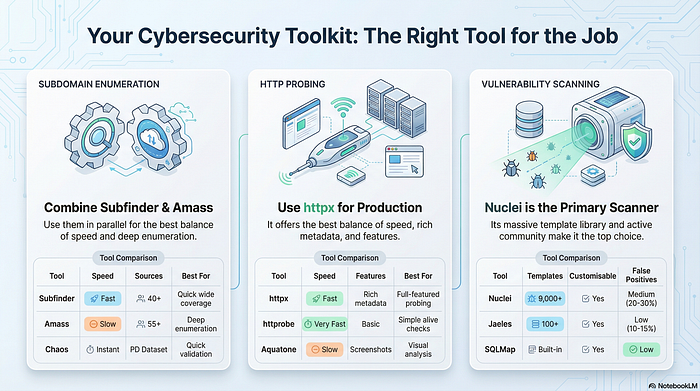
Real-World Success Stories (Documented)
Case Study 1: The Vidoc Security Lab
Approach: Custom automation tool (open-source "Vidoc") Timeline: 12 months Programs: 30+ simultaneously Results: $120,000+ in bounties Key Success Factor: Custom detection modules for their automation framework, reducing manual effort by 70%
Their insight: "Automation isn't about finding more bugs — it's about finding bugs faster and in more places simultaneously."
Case Study 2: ProjectDiscovery Tools User
Approach: Built around Nuclei + custom templates Timeline: 18 months to reach consistent $5K/month Programs: 15–20 private programs Results: $80,000+ annually Key Success Factor: Wrote 200+ custom Nuclei templates for specific technology stacks
Their insight: "Generic scanning is dead. Custom templates for specific frameworks is where automation still works."
Case Study 3: Axiom-Based Hunter
Approach: Distributed scanning with Axiom Timeline: 9 months to first $1K month Programs: 25+ public programs Results: Found critical bugs worth $10,000+ within weeks of program launches Key Success Factor: Speed advantage — finished reconnaissance in hours vs. days for competitors
Their insight: "I'm not smarter than other hunters. I'm just faster. By the time manual hunters finish recon, I've already tested and reported the obvious bugs."

Common Questions & Honest Answers
Q: How long before I earn my first dollar?
A: Realistic timeline:
- Months 1–3: $0 (building systems)
- Months 4–6: $100–500 (first valid bugs)
- Months 7–12: $500–2,000/month (consistent findings)
Anyone promising "earn $5K in 30 days with automation" is lying.
Q: Won't automated findings just be duplicates?
A: Yes, if you use default configurations. No, if you:
- Write custom Nuclei templates
- Focus on less competitive programs
- Use automation for recon, manual testing for exploitation
- Monitor continuously (catch bugs at deployment)
- Develop unique techniques
Q: What about WAFs and rate limiting?
A: Real concerns. Solutions:
- Rate limit your tools ( — rate-limit flags)
- Use distributed infrastructure (Axiom) for IP rotation
- Respect program guidelines
- Focus on passive reconnaissance first
- Get whitelisted when possible (communicate with programs)
Q: Do I need to be a programmer?
A: You need basic bash scripting and Python. You don't need to be a software engineer. If you can:
- Write a 100-line bash script
- Understand basic Python
- Read documentation
- Debug errors
You can build effective automation.
Q: Should I use paid tools?
A: Not initially. Master free/open-source tools first. Once you're earning $2K+/month consistently, paid tools (Burp Pro, better API limits) become worth it. But beginners spending $500 on tools before earning dollar one is backwards.
Final Thoughts: The Automation Mindset
Automation Isn't About Getting Rich Quick
It's about:
- Efficiency: Cover 10x more attack surface in the same time
- Consistency: Never forget to check something
- Opportunity detection: Catch new assets and changes quickly
- Scaling: Monitor many programs simultaneously
The Winning Formula
Success = (Technical Skills × Automation × Time) / Competition
Where:
- Technical Skills: Your understanding of vulnerabilities
- Automation: Your efficiency multiplier (1x to 10x)
- Time: Hours invested hunting
- Competition: How crowded your target programs are
Increase any factor, decrease competition → increase success.
The 60/40 Rule (Critical)
Successful automation hunters spend:
- 60% of time on automation: Building, maintaining, monitoring systems
- 40% of time on manual work: Validating findings, testing complex bugs, writing reports
If you're 90% automated, you're missing complex vulnerabilities. If you're 10% automated, you're too slow. The sweet spot is 60/40.
Start Today, Not Tomorrow
Every day you delay:
- Competitors are building their systems
- Programs are getting more competitive
- Vulnerabilities are being found by others
- You're not learning
The question isn't "Can automation make me $100K?"
The question is: "Will you put in the 2–3 years of work required?"
If yes, start today. If no, that's fine too — but don't blame automation for results you never tried to achieve.
Transparency & Corrections Welcome
Real talk: I built this guide by combining research from bug bounty blogs, Medium articles, Twitter threads, security books, and yes — AI tools (LLMs for research synthesis and image generation for concepts). I've tested what I could and verified sources, but some code snippets might need tweaking for your setup, and certain details may have changed since publication. Found something wrong? Code not working? Data outdated? Drop a comment below. I'll verify and update the article. Honest feedback makes this resource better for the whole community. And hey, if you spot spelling or grammar mistakes, feel free to ignore them — we're here for the technical knowledge, not the English class. 😊