

Web fuzzing is an automated testing method that sends many random, malformed, or unexpected inputs to a web application. Pentesters observes the application responses, status codes, and timings to find crashes, errors, or odd behavior. Those signs can reveal vulnerabilities such as XSS, Code Injection, SQL Injection, Sensitive data exposure, etc.
This cheat-sheet-style post will give beginners the practical basics of what fuzzing is, why it matters, how hackers find sensitive data by doing only fuzzing in bug bounty programs and some tips and tricks to find other vulnerabilities.
Tools & Wordlist File
Popular web-fuzzing tools include FFUF, Gobuster and DirBuster or Dirb for directory and file discovery, Burp Suite's Intruder for custom payloads.
FFUF and DirBuster comes pre isntalled in Kali Linux. So will use these only for this post.
Wordlists are simple text files full of likely filenames and folder names that fuzzing tools try on a web app to find hidden pages. You can think of them as a checklist the tool works through. The better the list, the more useful results you get. You can use ready-made collections like SecLists or create your own by collecting common names and removing duplicates. Tools such as ffuf and dirbuster read these files, so swapping or customizing a wordlist lets you target different sites more effectively.
Recent Kali releases include SecLists by default.

Directory & File Fuzzing
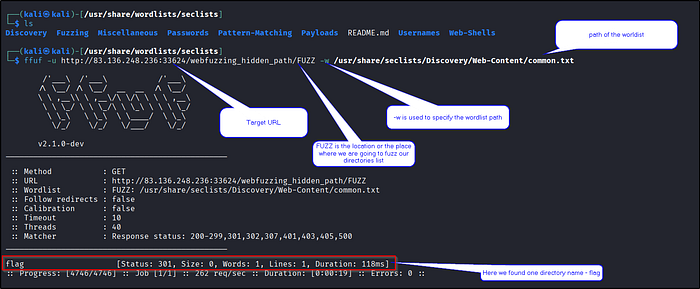
FFUF works by taking a wordlist and replacing each word into a URL placeholder (FUZZ), then sending those requests to the target and checks the responses. You give FFUF a URL like http://example.com/FUZZ and a wordlist, it tries http://example.com/admin, http://example.com/backup, http://example.com/config, etc., and records status codes and response sizes. Then we review the filtered results to find real pages or hidden files.
Directory Fuzzing : The first step is to perform directory fuzzing, which helps us discover hidden directories on the web server.
File Fuzzing :
While directory fuzzing focuses on finding folders, file fuzzing dives deeper into discovering specific files within those directories or even in the root of the web application. Web applications use various file types to serve content and perform different functions. Some common file extensions include: .php, .html, .txt, .js, .bak
By fuzzing for these common extensions with a wordlist of common file names, we increase our chances of discovering files that might be unintentionally exposed or misconfigured, potentially leading to information disclosure or other vulnerabilities.
For example, if the website uses PHP, discovering a backup file like config.php.bak could reveal sensitive information such as database credentials or API keys. Similarly, finding an old or unused script like test.php might expose vulnerabilities that attackers could exploit.
Lets see an example for both -
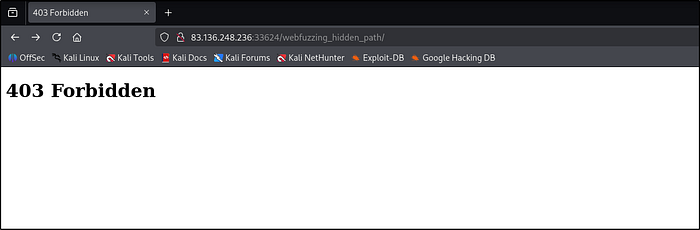
Below is our target appllication which shows default as 403 forbidden.
We can fuzz the directories as shown in below screenshot.
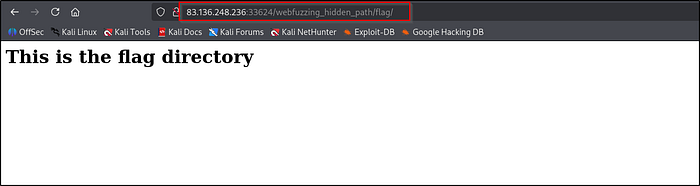
We can also do file fuzzing just by adding one more option in the command -e.
ffuf -u http://example.com/FUZZ -w /usr/share/seclists/Discovery/Web-Content/common.txt -e .php,.html,.txt,.bak,.jsRecursive Fuzzing
Recursion finds hidden pages that live under discovered folders (real-world sites often hide admin panels, backups, or legacy scripts in nested directories). It saves you from having to manually re-run scans for each discovered folder.
So basically when you run ffuf normally it tests words in the wordlist only at the URL you give (e.g. http://site/FUZZ). With -recursion, ffuf automatically follows any directory it finds and starts fuzzing inside that directory as well. So if fuzzing finds /admin/, recursion makes ffuf try http://site/admin/FUZZ next, which helps discover deeper, nested paths you'd miss with a single-level scan.
Without recursion -
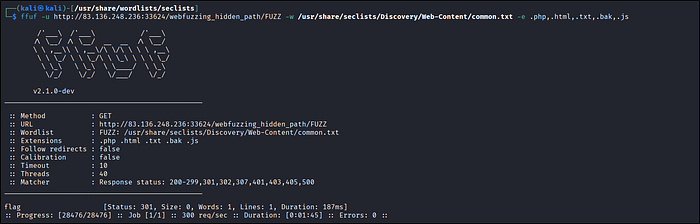
With recursion - It found 3 more files inside flag directory :)
ffuf -u http://example.com/something/FUZZ -w /usr/share/seclists/Discovery/Web-Content/common.txt/ -recursion -e .php, .html, .txt, .bak, .js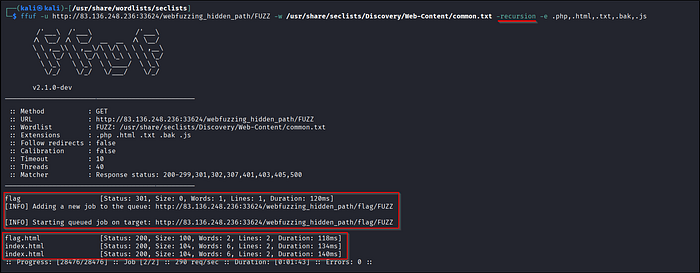
Parameter and Value Fuzzing
Fuzzing parameters may expose unpublished parameters that are publicly accessible. Such parameters tend to be less tested and less secured, so it is important to test such parameters for the web vulnerabilities we discuss in other modules.
Sometimes you land on a hidden directory but the page shows nothing, that often means the application is expecting a parameter (GET or POST). Instead of guessing the parameter we can simply fuzz that it with ffuf to try many values quickly.
Same thing we did before now we'll hunt for parameter names/values in GET requests. GET params appear after ? in the URL (e.g. https://example.com/hiddden/something.php?parameter=x) and you can use ffuf to fuzz many values quickly. Start with a small wordlist, check for different status codes and response lengths or sizes.
Let's see an exampple -
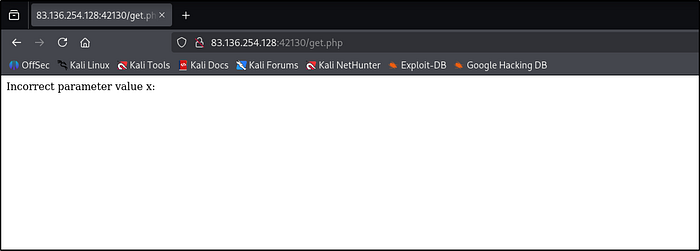
In the below screenshot we can see that a directory is there get.php which giving a message that incorrect value for parameter x. So we have to find the correct value.
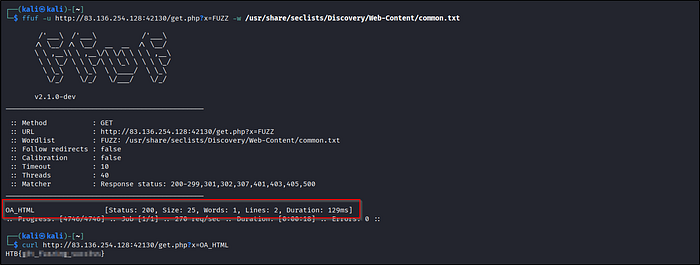
And we found the value of parameter x.
We can also use a tool called "wenum". It will work the same.
wenum -w /usr/share/seclists/Discovery/Web-Content/common.txt — hc 404 -u "http://example.com/get.php?x=FUZZ"Let's see another example for POST request, as shown in the below screenshot application is expecting a correct value for parameter y.
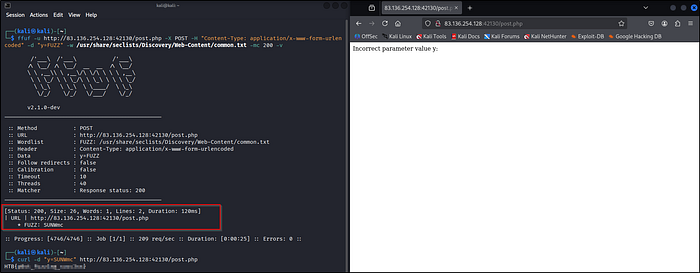
ffuf -u http://83.136.254.128:42130/post.php -X POST -H "Content-Type: application/x-www-form-urlencoded" -d "y=FUZZ" -w /usr/share/seclists/Discovery/Web-Content/common.txt -mc 200 -vAnd we got the final value of the parameter.
Also you can fuzz for cross site scripting, directory traversal, and other vulnerabilities just by picking the right SecLists payload file. Specify the parameter select the wordlist file and wait for the results :)
VHost & Subdomain Fuzzing
A subdomain is just a website under a main domain like mail.google.com is the "mail" subdomain of google.com. To find subdomains you try names and see if they resolve to an IP (if they do, they're probably live). You only need two things to start: a wordlist of names and the domain you want to check.
SecLists has ready-made lists under /seclists/Discovery/DNS/….
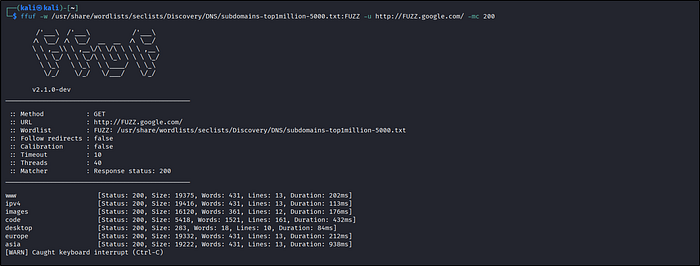
Here -mc just tells ffuf which status codes to show. So -mc 200 will only print results that return 200 OK. And we got some subdomains of google.com :)
We can also use a tool name "gobuster" it comes preinstalled with Kali Linux. Let's see an example to fuzz VHost.
gobuster vhost -u https://google.com:443 -w /usr/share/seclists/Discovery/Web-Content/common.txt — append-domain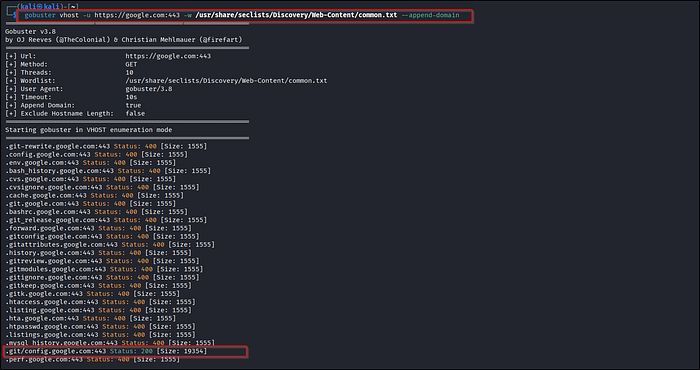
And we got some VHosts with different status codes.
Cheat Sheet Part
You can use any fuzzing tool you like just select a relevant wordlist file and set sensible threads, timeouts and filters so the scan runs fast but doesn't overwhelm the target.
FFUF -
# Basic Fuzzing of a URL path
  ffuf -u http://example.com/FUZZ

# Specify a wordlist
  ffuf -u http://example.com/FUZZ -w /path/of/wordlist/wordlist.txt

# Filter results to show only 200 status code responses
  ffuf -u http://example.com/FUZZ -w wordlist.txt -mc 200

# Filter results based on a regex pattern
  ffuf -u http://example.com/FUZZ -w wordlist.txt -mr "Hello"

# Adding extensions
  ffuf -u http://example.com/FUZZ -w wordlist.txt -e .php,.html

# Specifying threds
  ffuf -u http://example.com/FUZZ -w wordlist.txt -t 20
Gobuster -
# Basic syntax
  gobuster dir -u http://example.com -w wordlist.txt

# Adding extension
  gobuster dir -u http://example.com -w wordlist.txt -x .php,.html

# Filter results
  gobuster dir -u http://example.com -w wordlist.txt -s 200
Wenum -
# Basic fuzzing shows the output excluding 404
  wneum -c -z file,wordlist.txt --hc 404 http://example.com/FUZZ
Some more tools are there which I have not covered like feroxbuster, dirbuster, etc., but all works almost same.
Outro
So that's all for this post!
We saw how to do directory fuzzing to find hidden directories or sensitive files, subdomain and vhost enumeration, parameter fuzzing, etc., using different tools like ffuf, dirbuster, wenum, etc.
Also credits to HACKTHEBOX academy labs from where I performed some practicals and add screenshots in this post.
Hope you enjoyed this write-up! A like would make my day 😊👍