
As an AI application developer, I've experienced many excellent open-source TTS models. These models perform exceptionally well in certain situations, but they also have limitations. For example, the Kokoro model boasts good inference speed and synthesis quality, but it doesn't support voice cloning. This restricts its use cases. Recently, this problem has finally been solved by Qwen3-TTS. Qwen3-TTS fully supports voice cloning, voice design, and high-quality speech synthesis. It comes in 0.6B and 1.7B sizes and supports 10 mainstream languages, including English, Chinese, Japanese, Korean, German, French, Russian, Portuguese, Spanish, and Italian.
Qwen3-TTS Model List
Model Architecture
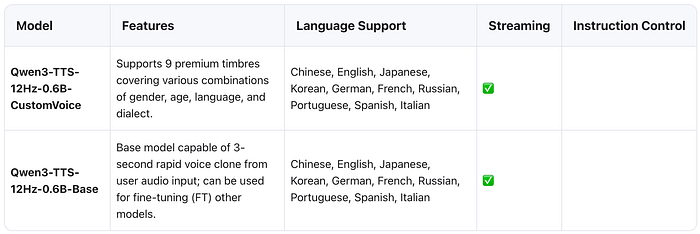
0.6B Model
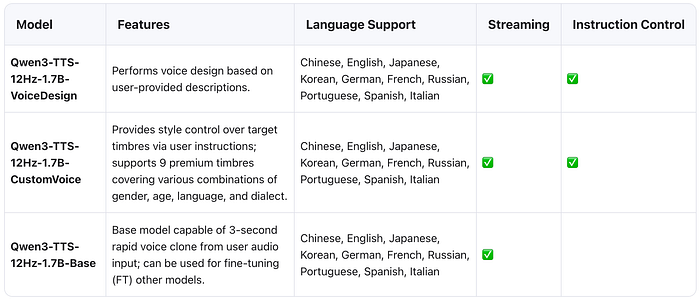
1.7B Model
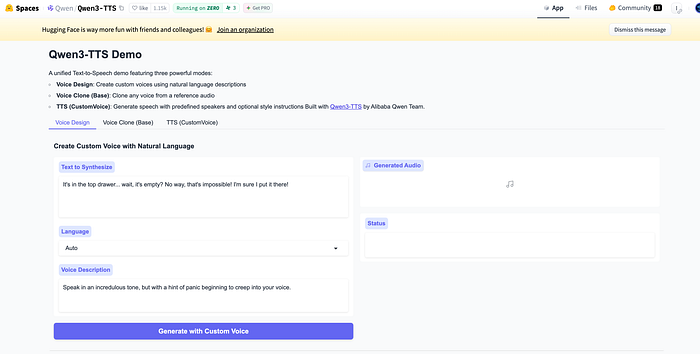
Online Demo
Open https://huggingface.co/spaces/Qwen/Qwen3-TTS in your browser to experience the Voice Design, Voice Clone, and Custom Voice features simultaneously.
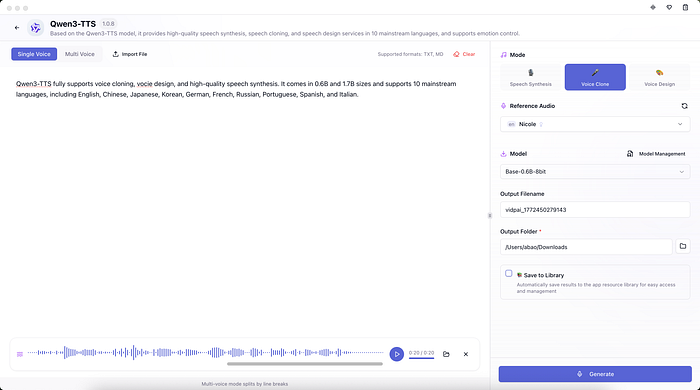
In addition, you can also use Vidpai, a local AI content creation studio we developed, to experience the full functionality of Qwen3-TTS.
Local Deployment
The official Qwen3-TTS documentation has detailed how to deploy Qwen3-TTS on Windows, so next I will introduce how to deploy Qwen3-TTS locally on macOS using mlx-audio.
- Configure the virtual environment
python3 -m venv .venv
source .venv/bin/activate
2. Install mlx-audio
pip install mlx-audio3. Download the model.
You can download the corresponding quantization model based on your computer configuration and actual needs.
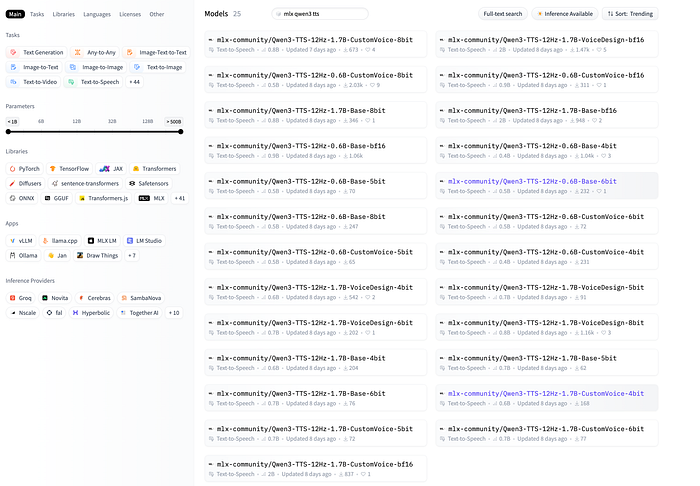
huggingface-cli download mlx-community/Qwen3-TTS-12Hz-0.6B-CustomVoice-bf16 --local-dir ./models/Qwen3-TTS-12Hz-0.6B-CustomVoice-bf16

huggingface-cli download mlx-community/Qwen3-TTS-12Hz-0.6B-Base-bf16 --local-dir ./models/Qwen3-TTS-12Hz-0.6B-Base-bf16

huggingface-cli download mlx-community/Qwen3-TTS-12Hz-1.7B-VoiceDesign-8bit --local-dir ./models/Qwen3-TTS-12Hz-1.7B-VoiceDesign-8bit
4. Custom Voice
from pathlib import Path

import soundfile as sf

from mlx_audio.tts.utils import load_model

model = load_model("./models/Qwen3-TTS-12Hz-0.6B-CustomVoice-bf16")
results = list(model.generate_custom_voice(
    text="I'm so excited to meet you!",
    speaker="Vivian",
    language="English",
    instruct="Very happy and excited.",
))

if not results:
    raise ValueError("No audio generated")

final = results[0]
output_path = Path(__file__).parent / "custom_voice.wav"
sf.write(str(output_path), final.audio, final.sample_rate)
print(f"Audio saved to: {output_path}")
5. Voice Clone
from pathlib import Path

import soundfile as sf

from mlx_audio.tts.utils import load_model

model = load_model("./models/Qwen3-TTS-12Hz-0.6B-Base-bf16")
results = list(model.generate(
    text="A unified Text-to-Speech demo featuring three powerful modes",
    ref_audio="custom_voice.wav",
    ref_text="I'm so excited to meet you!",
))

if not results:
    raise ValueError("No audio generated")

final = results[0]
output_path = Path(__file__).parent / "voice_clone.wav"
sf.write(str(output_path), final.audio, final.sample_rate)
print(f"Audio saved to: {output_path}")
6. Voice Design
from pathlib import Path

import soundfile as sf

from mlx_audio.tts.utils import load_model

model = load_model("./models/Qwen3-TTS-12Hz-1.7B-VoiceDesign-8bit")
results = list(model.generate_voice_design(
    text="Big brother, you're back!",
    language="English",
    instruct="A cheerful young female voice with high pitch and energetic tone.",
))

if not results:
    raise ValueError("No audio generated")

final = results[0]
output_path = Path(__file__).parent / "voice_design.wav"
sf.write(str(output_path), final.audio, final.sample_rate)
print(f"Audio saved to: {output_path}")
Summary
Qwen3-TTS is a powerful TTS model; if you have speech synthesis needs, you can evaluate its capabilities. Additionally, mlx-audio is another noteworthy open-source project. Based on Apple's MLX framework, it allows developers to easily run various excellent TTS, STT, and STS models on Apple Silicon.